Introduction: Why Your Energy-Efficient Home Office Pays for Itself
The average remote worker spends 8–10 hours daily in their home office. A poorly optimized setup silently draws 600–900 watts per hour — that’s the equivalent of running a small window AC unit for your workday alone.
In 2026, building an energy-efficient home office isn’t a lifestyle choice — it’s a financial and environmental imperative. Global electricity rates have risen 18–22% since 2022 in most OECD countries. Meanwhile, AI-powered smart home ecosystems, next-gen display technology, and ultra-low-power processors have made efficiency upgrades cheaper and more impactful than ever.
This guide delivers everything you need: hardware specs, smart automation strategies, power audit methodology, and a clear ROI framework. No filler. Every sentence earns its place.
1. Power Audit First: Know Your Baseline Before Upgrading
You cannot optimize what you haven’t measured. Before purchasing a single device, run a 7-day power audit.
Tools required:
- Smart plug with energy monitoring (e.g., Tapo P115, Kasa EP25) — tracks real-time wattage per device
- Whole-home energy monitor (e.g., Emporia Vue 3, Sense Gen 3) — maps circuit-level consumption
- Free software: Home Assistant energy dashboard or Apple Home energy panel (iOS 18+)
Typical findings from a pre-optimization audit:
| Device | Average Draw (Active) | Average Draw (Idle/Standby) |
|---|---|---|
| Gaming/Workstation PC | 250–450W | 80–120W |
| Dual 27″ LCD monitors | 80–130W | 4–8W |
| Laptop (plugged in) | 45–85W | 15–25W |
| Laser printer | 350–500W (printing) | 5–10W (standby) |
| External speakers | 15–40W | 2–6W |
| Wi-Fi router | 8–15W | 8–15W (always on) |
| Desk lamp (incandescent) | 40–60W | — |
| HVAC for one room | 800–1,500W | — |
Key insight: Standby power (“vampire draw”) from idle monitors, printers, and USB hubs can account for 10–15% of your monthly office electricity bill. Smart power strips with energy monitoring and auto-shutoff eliminate this silently.
2. Energy-Efficient Home Office Hardware: The 2026 Buyer’s Matrix
This is the highest-leverage category. Your hardware choices lock in your baseline consumption for 3–5 years.
2.1 Monitors: OLED and Mini-LED Change the Math
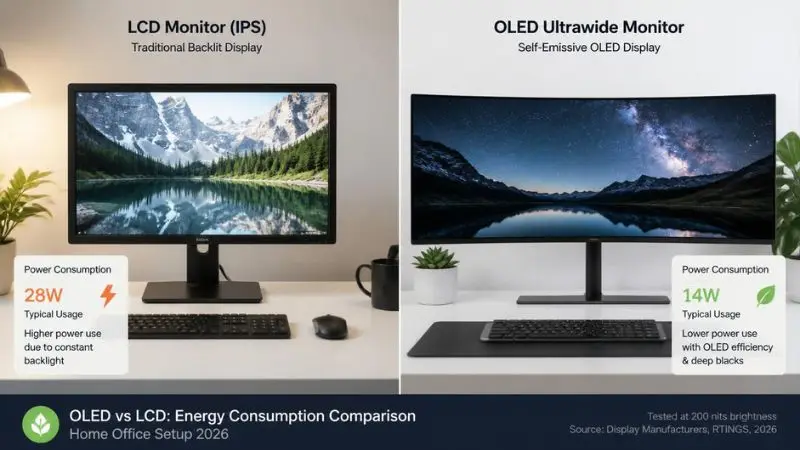
Traditional IPS/VA panels run a full backlight at all times. OLED and QD-OLED displays only power the pixels that need light — black pixels consume near-zero power. For more details on efficiency ratings, you can check Energy Star’s guidelines.
2026 Monitor Efficiency Comparison:
| Panel Type | Typical Power (100% brightness) | Power at 50% brightness | HDR Peak Power |
|---|---|---|---|
| VA/IPS 27″ LCD | 28–55W | 18–32W | 55–80W |
| Mini-LED 32″ | 35–60W | 20–35W | 80–120W |
| OLED 27″ (1440p) | 20–38W | 12–22W | 40–65W |
| QD-OLED 34″ Ultrawide | 25–45W | 15–28W | 50–90W |
| E-Ink secondary display | 0.5–2W | 0.3W | — |
Expert recommendation: Pair a 27″ QD-OLED primary display (for color-critical work) with a 13″ E-Ink secondary display (Dasung Paperlike Pro or Boox Mira) for reference documents. The E-Ink panel draws virtually zero power and dramatically reduces eye strain during long reading sessions.
Brightness calibration tip: The human eye cannot distinguish between 300 nits and 250 nits in typical office lighting. Reducing monitor brightness from 100% to 60–70% cuts backlight power by 30–40% on LCD panels with negligible perceptual quality loss.
2.2 Computing Hardware: ARM vs. x86 in 2026
The CPU architecture war has a clear winner for energy efficiency: ARM.
Platform Power Consumption (measured at wall, full workload):
| Platform | TDP (Chip) | Full System Draw | Idle Draw | Battery Life (laptop) |
|---|---|---|---|---|
| Intel Core Ultra 9 285H (x86) | 45W | 65–90W | 12–18W | 8–11 hrs |
| AMD Ryzen AI 9 HX 370 (x86) | 45W | 60–85W | 10–16W | 9–13 hrs |
| Apple M4 Pro (ARM) | 20W | 28–45W | 4–8W | 18–22 hrs |
| Qualcomm Snapdragon X Elite (ARM) | 23W | 32–50W | 5–9W | 16–20 hrs |
| Apple M4 Mac Mini (desktop) | 10–22W | 12–28W | 4–7W | — |
Bottom line: An Apple M4 Mac Mini used as a desktop workstation draws 12–28W under load — compared to 180–350W for a mid-range x86 tower. For knowledge workers, writers, developers, and designers, ARM-based computing cuts office PC power consumption by 60–75%.
If x86 is required (legacy software, specific GPU workloads), choose a laptop over a desktop tower. A plugged-in laptop is 3–4x more energy-efficient than a comparable desktop due to its battery-optimized power delivery system.
2.3 Peripherals: The Overlooked 15%
Peripherals collectively consume 15–20% of a typical home office’s power budget.
High-impact swaps:
- Replace wired USB hubs with powered smart hubs (e.g., Anker 777 with per-port power control) — cut idle peripheral draw by 40–60%
- Switch to wireless peripherals with sleep modes — modern Logitech MX Master 4 and MX Keys S use <0.5W in active use, micro-watts asleep
- Eliminate standby-hungry laser printers — if printing is infrequent, use a cloud print service or an Energy Star-certified inkjet. HP’s OfficeJet Pro 9135e uses 2.1W standby vs. 8.5W for a typical laser
- Speakers: Replace 2.1 desktop speaker sets with a single powered monitor speaker or high-quality headphones; reduces audio system draw from 25–40W to 2–5W
3. Smart Power Management: Automation That Works While You Don’t
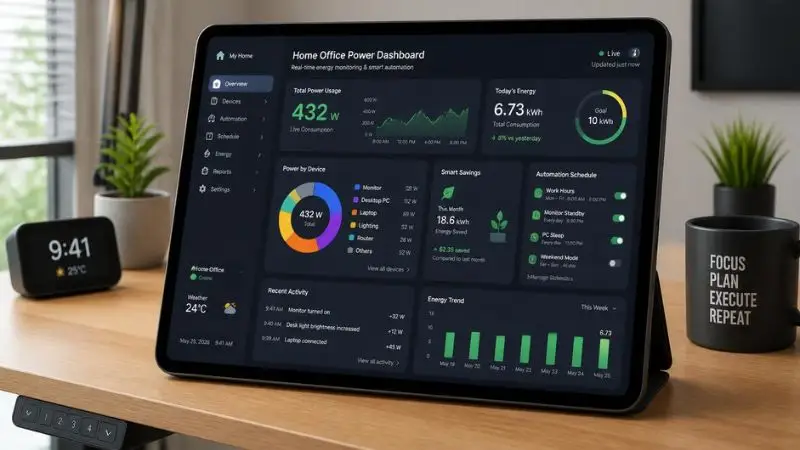
Intelligent automation eliminates the human error factor in energy management — the forgotten standby device, the monitor left on overnight, the laptop charger always plugged in.
3.1 Smart Power Infrastructure
Tier 1 — Device-level control:
- Smart plugs with energy monitoring: Tapo P115 (Wi-Fi, 0.1W accuracy), Shelly Plug S (local API, no cloud dependency) — approximately $12–18/unit
- Smart power strips: Kasa EP40M (8 outlets, 4 always-on, 4 individually controlled) — eliminates the “one plug to rule them all” problem of traditional strips
Tier 2 — Circuit-level intelligence:
- Smart circuit breakers (Leviton Load Center, Span Panel) — control and monitor by circuit, not just device. Ideal for whole-office automation
- Integration platform: Home Assistant (local, free, privacy-preserving) connects Zigbee/Z-Wave/Wi-Fi devices into unified automations
Sample automation ruleset (Home Assistant YAML logic):
Workday start (8:00 AM):
  → Power on monitor strip
  → Enable desk lamp scene (warm white, 350 lux)
  → Start PC/Mac via Wake-on-LAN

Workday end (6:30 PM + no motion for 15 min):
  → Display shutdown command via HDMI-CEC
  → Power off monitor strip (kills vampire draw)
  → Switch desk lamp off
  → Log daily kWh to dashboard

Weekend/Holiday:
  → All office circuits on minimal standby
  → Router on scheduled reboot (1:00 AM) for firmware updates
Savings estimate: This automation profile alone saves 1.5–2.5 kWh/day — or $65–120/year at average 2026 US electricity rates ($0.16–0.18/kWh).
3.2 Presence Detection: The Missing Link
Motion-sensor lighting is table stakes. In 2026, the cutting edge is occupancy-aware computing.
- mmWave radar sensors (Aqara FP2, Tuya 5.8GHz) detect presence even when still — no false “away” triggers from focused desk work
- Integration behavior: When the sensor detects no presence for 8+ minutes → dim monitors to 20%, pause non-critical background tasks, enable PC low-power state
- Return detection: Full-brightness restore + PC wake in <3 seconds
This is particularly valuable for households where someone enters and exits the office frequently — eliminating the manual screen-wake cycle and unnecessary full-power operation.
4. Lighting: The Watt-per-Lux Equation
Lighting for a home office has two objectives: adequate task illumination (300–500 lux on the work surface) and minimal glare on screens. Most setups over-illuminate with energy-inefficient sources.
2026 Lighting Efficiency Benchmarks:
| Source | Efficacy (lm/W) | Color Rendering (CRI) | Dimming | Lifespan |
|---|---|---|---|---|
| Incandescent | 10–15 lm/W | 100 | Yes (analog) | 1,000 hrs |
| Halogen | 15–25 lm/W | 100 | Yes | 2,000 hrs |
| CFL | 40–70 lm/W | 80–85 | Limited | 8,000 hrs |
| Standard LED (2020) | 80–100 lm/W | 80–90 | Yes (smart) | 25,000 hrs |
| Premium LED (2026) | 130–200 lm/W | 95–98 | Yes (0–100%) | 50,000 hrs |
| OLED Panel Light | 80–120 lm/W | 95+ | Yes | 30,000 hrs |
Practical setup for a 10×12 ft home office:
- Primary ambient: 1× BenQ ScreenBar Halo or Elgato Key Light Air (LED, CRI 95+, 6W) — mounts on monitor, eliminates desk lamp entirely
- Task lighting: Ergonomic LED arm lamp, 8–12W, 4000K color temperature for focus tasks
- Bias lighting: LED strip behind monitor (Govee or Philips Hue gradient), 5–10W total — reduces eye strain by decreasing contrast ratio between screen and ambient, allowing monitor brightness reduction of 20–30%
Net result: Replace a 60W incandescent desk lamp + 40W floor lamp with the above LED configuration (23–28W total) while achieving superior illumination quality. Annual savings: ~50–70 kWh.
5. Thermal Management: HVAC Is Your Biggest Power Consumer
In most climates, heating or cooling the home office represents 40–60% of its total energy footprint — yet it’s the category most people ignore when optimizing.
High-impact strategies:
Zoning: Use a smart mini-split (e.g., Mitsubishi MSZ-FS series, 17–21 SEER2) for the office room only. Running a central HVAC system to condition your entire home for one occupied room is energetically wasteful by a factor of 3–5x.
Scheduling: Set office HVAC to pre-condition 20 minutes before work starts (ramp from setback temperature) rather than running continuously. Smart thermostats (ecobee SmartThermostat Premium, Nest Learning Thermostat 4) with room sensors handle this automatically.
Passive thermal load reduction:
- External window shades or solar film (reduces solar heat gain by 40–70% in summer)
- Proper insulation of office walls/ceiling — a 2-inch spray foam upgrade can cut HVAC load by 25–35%
- Strategic plant placement (large-leafed plants near windows act as natural evaporative coolers)
Ceiling fan optimization: A ceiling fan costs ~25W to run. In a well-insulated office, it can allow raising the AC setpoint by 3–4°F (1.7–2.2°C) with no perceived comfort loss — saving 10–15% on cooling costs.
6. Renewable Integration: Closing the Loop on Your Energy-Efficient Home Office
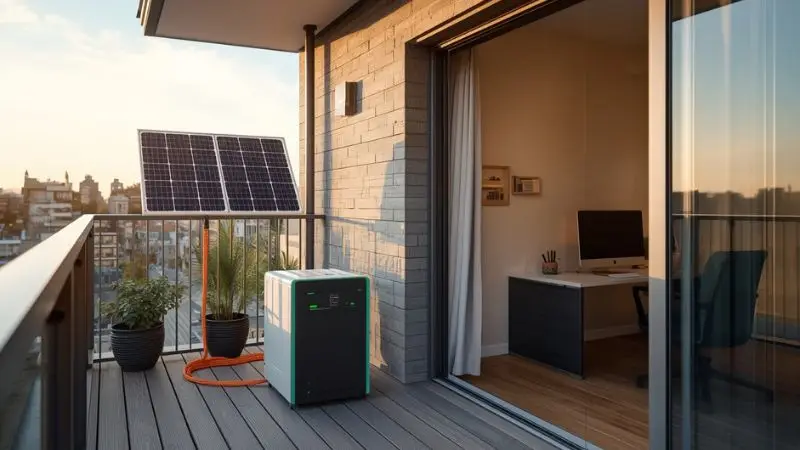
You don’t need rooftop solar to leverage renewables in 2026. The portable and balcony solar market has matured dramatically.
6.1 Portable Power Station + Balcony Solar
A 400–800W balcony solar array paired with a 1–2 kWh portable power station (EcoFlow Delta 2, Jackery Explorer 1000 Plus, Bluetti AC180) can power an efficient ARM-based home office for 4–8 hours on solar alone.
System sizing for an efficient office (ARM laptop + OLED monitor + LED lighting = ~80W total):
| Solar Array | Daily Generation (4hr peak sun) | Office Hours Covered |
|---|---|---|
| 200W panel | 600–800 Wh | ~7–10 hours |
| 400W array | 1,200–1,600 Wh | Full workday + overflow |
| 600W array | 1,800–2,400 Wh | Full workday + charge buffer |
Regulatory note: In Germany, Austria, and the Netherlands, plug-in balcony solar systems up to 800W (2,000W as of the 2024 German reform) require only a simple notification, not a full permit. Regulations vary — verify local codes before installation.
6.2 Time-of-Use Rate Arbitrage
If you’re on a time-of-use electricity tariff (increasingly common globally), charge your power station during off-peak hours (typically 9 PM–6 AM at 40–60% lower rates) and run your office from battery during peak hours (9 AM–8 PM). The EcoFlow DELTA Pro 3 and Anker SOLIX F3800 support scheduled charging natively.
Annual savings from ToU arbitrage on a typical remote worker: $80–200, depending on rate differential and consumption.
7. Ergonomics + Energy: The Standing Desk ROI
A standing desk is an energy decision, not just a health one.
Electric sit-stand desks consume 100–200W during height adjustment (10–30 seconds) — negligible in isolation. The energy argument for standing desks is indirect but real:
- Reduced fatigue → less need for artificial stimulants (coffee machine, additional lighting) → fewer devices powered longer
- Better circulation → reduced need for space heating in cold climates (active standing raises metabolic heat output)
- Treadmill desk option: A walking pad (1–3 mph) consumes 200–400W — weighs against reduced need for separate gym equipment/commute
Recommended 2026 standing desk features for energy-conscious buyers:
- Built-in USB-C PD charging port (eliminates a wall charger)
- Cable management channel with integrated smart strip mount
- Memory presets to minimize motor runtime
Quick-Win Checklist: 30 Minutes to a Leaner Office
The following changes require no new purchases and can be implemented today:
- Enable “auto power off” on all monitors (set to 8–12 minutes, not 30)
- Switch all PC/Mac power plans to “Balanced” or “Low Power” (disables aggressive CPU boost in idle)
- Enable printer “deep sleep” mode (most modern printers support sub-1W deep sleep)
- Reduce display brightness by 20–30% (use f.lux or Apple Night Shift for circadian-appropriate adjustments)
- Unplug USB-C chargers when laptop battery hits 80% (reduces heat and standby draw)
- Enable router scheduled reboot and WPA3 (improves efficiency of device associations)
- Set all smart speakers to “do not disturb” during work hours (eliminates wake-word listening power in unnecessary contexts)
ROI Summary: What Does an Energy-Efficient Home Office Save?
| Upgrade | Upfront Cost | Annual Savings | Payback Period |
|---|---|---|---|
| Smart plugs + automation (10 outlets) | $80–150 | $65–120 | 1–2 years |
| LCD → OLED monitor upgrade | $250–500 premium | $20–40 | 8–15 years |
| x86 desktop → ARM laptop/mini | $0–800 (replacement) | $100–220 | 2–5 years |
| Incandescent → premium LED lighting | $40–80 | $50–70 | 6–18 months |
| Smart mini-split (office zone) | $800–2,000 installed | $150–400 | 3–8 years |
| 400W balcony solar + 1kWh station | $600–900 | $120–280 | 3–6 years |
| Total (all upgrades) | $1,770–4,430 | $505–1,130/yr | 2–5 years avg |
Savings estimates based on the US average electricity rate of $0.17/kWh (2026), 250 working days/year, 9-hour workday. Adjust for local rates.
Conclusion: Build Your Energy-Efficient Home Office as a System
An energy-efficient home office isn’t a single purchase — it’s an integrated system where hardware efficiency, smart automation, renewable supply, and behavioral habits compound each other.
Start with the power audit. Identify your three largest consumers. Address those first. The smart plug infrastructure investment is the single highest-ROI first step: it gives you data and control simultaneously for under $150.
In 2026, the fully optimized energy-efficient home office — ARM computing, OLED display, LED lighting, smart power management, and balcony solar — can operate on 60–90W of continuous power. Compare that to the 600–900W baseline of an unoptimized 2020-era setup. That’s an 85% reduction in consumption with zero compromise to productivity. For a broader understanding of household efficiency, refer to the U.S. Department of Energy’s official guide.
Work smarter. Power down harder.
For More Information, Visit Our Website:
- 5 Smart Home Gadgets You Didn’t Know Could Improve Your Health 2026
- Stop Wasting Money: The Ultimate Guide to Inverter Energy Savings 2026
- Tesla Powerwall 3 Review: An Honest Guide to Price, Performance & 2026 Tech
- Front Load vs Top Load Washers: The Ultimate 2026 Guide to Saving Water & Money
- Air Fryer vs Microwave: Which is More Energy Efficient in 2026?