Chapter 1: Introduction — Why Home Energy Storage Is No Longer Optional
The Energy Independence Revolution Has Arrived
This honest Tesla Powerwall 3 starts with a simple truth: your electricity bill didn’t used to feel like a crisis. Now it does.
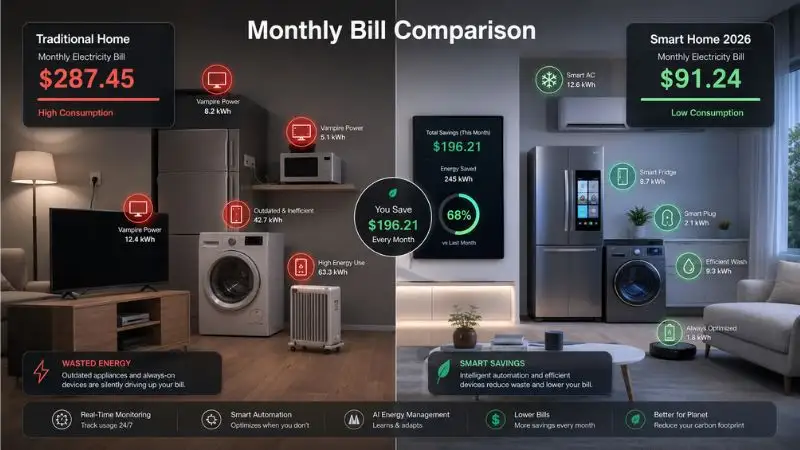
In the last five years, average U.S. residential electricity rates have climbed over 30%. In states like California, Hawaii, and Massachusetts, some homeowners are paying more than $0.35 per kilowatt-hour — rates that were unthinkable just a decade ago. Meanwhile, wildfires, hurricanes, and aging grid infrastructure have made blackouts longer, more frequent, and harder to predict.
Something shifted. Energy stopped being a utility you ignored and became a problem you had to solve.
That’s why millions of homeowners are now turning to home battery storage — and why the Tesla Powerwall 3 has become one of the most talked-about products in the residential energy space. Not because of a marketing campaign, but because the timing finally makes sense.
This guide was written to give you something most reviews don’t: the full picture. Not just specs and price tags, but honest answers to the questions that actually matter — Is it worth it? Will it work for my home? What does the installation process really look like? And is 2025 the right time to buy, or should I wait?
By the time you finish reading, you’ll have everything you need to make a confident, informed decision.
Why 2025–2026 Is a Pivotal Year for Home Battery Technology
Three things are happening right now that make this moment unlike any before it:
- Federal incentives are at their peak. The Inflation Reduction Act’s 30% Investment Tax Credit (ITC) currently applies to standalone battery systems — even without solar. This is a relatively new change, and future policy shifts are uncertain.
- Battery technology took a generational leap. The Powerwall 3 isn’t just an incremental update. Its built-in solar inverter, 97.5% round-trip efficiency, and 11.5 kW continuous output represent a meaningful jump over anything available just three years ago.
- Utility rates and grid instability are accelerating. The financial case for battery storage strengthens every time your electricity rate rises — and rates have been rising consistently.
Waiting may feel safer. But for many homeowners, 2025 is genuinely one of the best windows to act.
Who This Guide Is For
This is not a guide written for engineers or energy economists. It’s written for regular homeowners who want clear, honest information without the jargon.
That said, it covers a lot of ground — so here’s how to know if it’s the right resource for you:
You’ll get the most value from this guide if you are:
- A homeowner actively considering a solar + battery system wants to understand whether the Powerwall 3 is the right choice
- An existing Tesla solar customer running Powerwall 1 or 2, wondering whether upgrading to Powerwall 3 makes financial sense
- A tech-savvy consumer who’s been comparing home battery brands — Enphase, Generac, Sonnen — and wants a thorough, side-by-side breakdown
- Someone who has received a quote for a Powerwall installation and wants a second opinion before signing
This guide is not for you if:
- You’re looking for commercial or industrial energy storage solutions
- You want a quick “yes or no” answer without understanding the reasoning behind it
Fair warning: this guide is detailed. It’s built to be the only resource you need — not a skimming exercise.
Definition — What Is a Home Battery Storage System?
📖 Definition
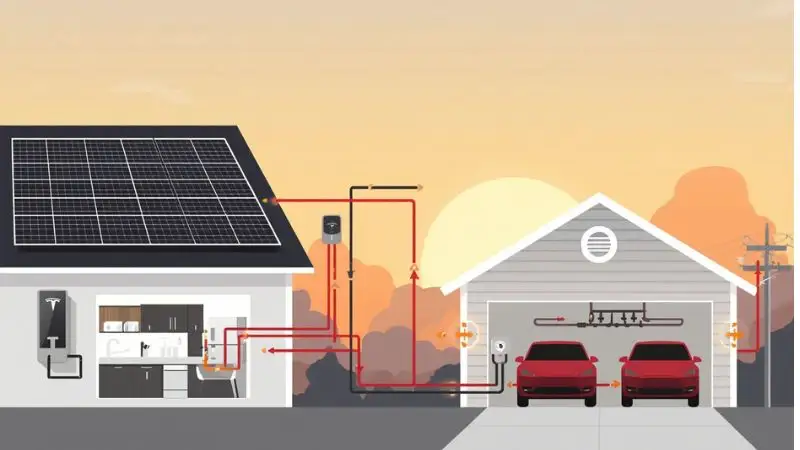
A home battery storage system is a rechargeable energy unit that stores electricity — either from solar panels or the utility grid — and releases it on demand to power your home. It can activate automatically during a grid outage, discharge during expensive peak-rate hours to reduce your electricity bill, or run your home in off-grid scenarios. Think of it like a giant, intelligent power bank for your entire house.
The keyword in that definition is intelligent. Modern home batteries don’t just store energy — they make decisions. They monitor electricity prices, weather forecasts, your personal usage patterns, and grid status in real time. Then they automatically adjust when to charge, when to discharge, and how much reserve to keep for emergencies.
This is what separates a 2025-era battery system from a simple backup generator. A generator runs on fuel and needs manual intervention. A battery system runs itself.
💡 Did You Know?
Global residential battery storage installations are projected to reach 42 GWh annually by 2026 — a 300% increase from 2021 levels, according to BloombergNEF. To put that in perspective, that’s enough storage capacity to power every home in New York City for more than two full days.
The residential battery market isn’t a niche experiment anymore. It’s a fast-moving mainstream industry, and the products have matured rapidly to match that demand.
🔧 Pro Tip
If you’ve already received an installation quote from Tesla or another provider, don’t skip ahead to the pricing chapter alone. The installation process (Chapter 5) and software features (Chapter 6) often contain the hidden costs and the hidden value that quotes don’t mention. Read both before you sign anything.
What to Expect From This Guide
This guide is structured as a logical journey — from understanding what the Powerwall 3 is, to deciding whether you should buy one. Here’s a quick map:
- Chapter 2 — What the Powerwall 3 actually is, how it evolved from previous versions, and what its specs mean in plain language
- Chapter 3 — A deep dive into real-world performance: power output, efficiency, battery chemistry, and how it holds up in different climates
- Chapter 4 — Full pricing breakdown, available tax credits and rebates, and an honest ROI analysis for different types of homeowners
- Chapter 5 — The step-by-step installation process: what happens from your first quote to the day it turns on
- Chapter 6 — The Tesla app, smart charging modes, Storm Watch, and how the Powerwall 3 integrates with the broader Tesla ecosystem
- Chapter 7 — Head-to-head comparisons with top competitors: Enphase, Generac, Sonnen, LG, and newer 2025 entrants
- Chapter 8 — Real owner case studies from California, Texas, and the Northeast — honest results, not marketing copy
- Chapter 9 — What’s coming next: Vehicle-to-Home charging, AI energy optimization, and what Powerwall 4 might look like
- Chapter 10 — A clear decision framework: should you buy, wait, or consider an alternative?
Already partway through your buying journey? Jump directly to the chapter that answers your current question. Each chapter is written to stand on its own, so you won’t lose context by starting in the middle.
One last note before we begin: this guide does not accept sponsored placements. The opinions here are based on publicly available specifications, third-party testing data, and verified owner experiences. Where we’re uncertain, we’ll tell you.
Let’s get into it.
Next: Chapter 2 — Tesla Powerwall 3: What Exactly Is It? →
Chapter 2: Tesla Powerwall 3 — What Exactly Is It?
Definition — The Powerwall 3 Explained in Plain English
Before we talk about price, performance, or whether it’s right for your home, let’s make sure we’re on the same page about what the Powerwall 3 actually is.
📖 Definition
The Tesla Powerwall 3 is the third-generation residential lithium iron phosphate (LFP) battery system manufactured by Tesla Energy. Unlike its predecessors, it features a built-in solar inverter, which means it can connect directly to your solar panels and manage your home’s energy — all in one unit. Think of it as Tesla’s most complete home energy solution to date: a battery, an inverter, and an energy manager, packaged into a single wall-mounted device.
That last part — the built-in inverter — is the detail that changes everything. We’ll explain exactly why in a moment.
In simple terms, the Powerwall 3 stores energy when it’s cheap or abundant (from your solar panels or overnight grid power) and releases it when you need it most — during a blackout, during peak-rate hours, or whenever you want to run your home without drawing from the grid.
It’s not just a backup battery. It’s a full energy management system for your home.
The Evolution: Powerwall 1 → 2 → 3
To understand why the Powerwall 3 matters, it helps to see where Tesla started and how far the product has come. Each generation solved a real problem — and introduced new limitations that the next version fixed.
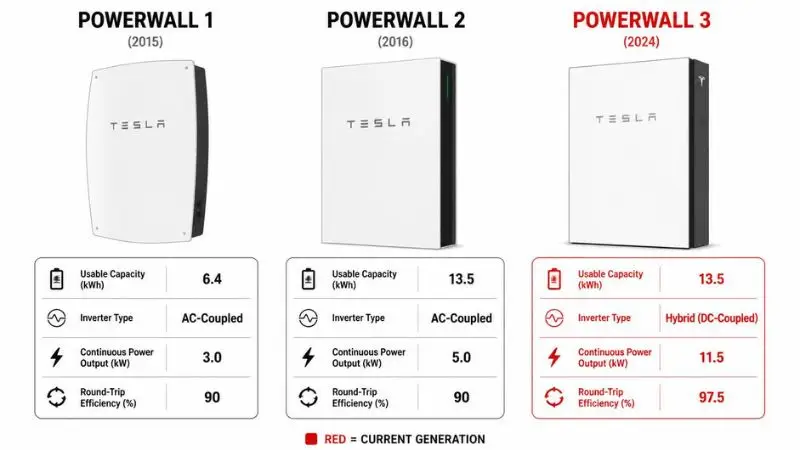
Powerwall 1 (2015) — The Pioneer
When Tesla launched the original Powerwall in 2015, it was a genuine breakthrough. Home battery storage existed before, but nothing at this scale had been designed for mainstream residential use.
Key specs:
- Usable capacity: 6.4 kWh
- Output: DC-only (required a separate compatible inverter)
- Weight: 220 lbs (100 kg)
- Compatible inverters: Limited to a short list of approved partners
The Powerwall 1 proved the concept worked. But it had real limitations. Its 6.4 kWh capacity wasn’t enough to power a typical home through a full night. And because it was DC-only, you needed a compatible inverter already installed — which ruled out most existing homeowners.
Tesla discontinued the Powerwall 1 in 2016. Its legacy was the idea, not the hardware.
Powerwall 2 (2016–2023) — The Mainstream Moment
The Powerwall 2 was where Tesla got serious. Launched in late 2016, it more than doubled the capacity of its predecessor and became the best-selling home battery in the world for several years running.
Key specs:
- Usable capacity: 13.5 kWh
- Architecture: AC-coupled (worked with virtually any solar inverter)
- Continuous power output: 5 kW (7 kW peak)
- Round-trip efficiency: ~90%
- Required: Separate gateway unit for monitoring and grid interaction
The Powerwall 2’s AC-coupled design was its superpower. It could be added to almost any existing solar installation without replacing the inverter. That made it enormously flexible — and enormously popular.
Its weakness? Efficiency. Every time energy was converted from DC (solar) to AC (home use) to DC (battery storage) and back to AC again, a small percentage was lost. That four-step conversion process was the price of flexibility.
Powerwall 3 (2024–2026) — The Integrated Era
The Powerwall 3 launched in 2024 and represents a fundamental rethink — not just an upgrade.
Key specs:
- Usable capacity: 13.5 kWh (same as PW2)
- Architecture: DC-coupled with built-in solar inverter
- Solar input: Up to 20 kW DC (3 independent MPPT trackers)
- Continuous power output: 11.5 kW (more than double the Powerwall 2)
- Peak power output: 22 kW (10-second burst)
- Round-trip efficiency: 97.5%
- Gateway: Integrated — no separate unit needed for most installs
The capacity didn’t change. Almost everything else did.
💡 Did You Know?
The Powerwall 3’s continuous power output of 11.5 kW is more than double the Powerwall 2’s 5 kW. In practical terms, that means it can simultaneously run a central air conditioner (3–5 kW), a Level 2 EV charger (7.2 kW), and a refrigerator — something the Powerwall 2 couldn’t do alone without risk of overload.
Key Physical Specifications at a Glance
Numbers on a spec sheet can be abstract. Here’s what the Powerwall 3’s physical specs actually mean for your home and your installation.
Dimensions and Weight
The Powerwall 3 measures 43.25 inches tall × 24 inches wide × 7.6 inches deep. It weighs 287 lbs (130 kg) — noticeably heavier than the Powerwall 2’s 251 lbs.
That extra weight is directly due to the integrated inverter. You’re not just getting a battery — you’re getting a battery plus hardware that previously required a separate box. For most installations, the net result is actually less wall space used overall, because you no longer need a standalone gateway or separate inverter cabinet.
Your installer will mount it to a structural wall using the included anchor hardware. The unit is designed to handle its own weight safely, but your installer will confirm the wall type (wood stud, concrete block, or masonry) before mounting.
Installation Footprint
The Powerwall 3 carries an IP67 weatherproof rating, which means it’s fully sealed against dust and can withstand temporary water submersion. In practical terms, this means:
- It can be installed indoors or outdoors
- It handles direct rain exposure (though shade is preferred in extreme heat climates)
- No additional weatherproof enclosure is required
For most new installations, you also won’t need a separate Tesla Gateway unit. The Powerwall 3 handles grid monitoring, utility communication, and backup switching internally. This simplifies the installation and reduces the number of components on your wall.
Operating Temperature Range
The Powerwall 3 operates between -4°F and 122°F (-20°C to 50°C). This covers the vast majority of global climates, including:
- Canadian winters (where -4°F is a realistic overnight low)
- Arizona and Middle Eastern summers (where 110°F+ ambient temperatures are common)
One important nuance: efficiency drops slightly at the temperature extremes. In sub-zero conditions, the battery management system uses a small amount of stored energy to keep the cells warm. In extreme heat, the unit’s thermal management works harder. Real-world owners in very cold climates report approximately 8–12% efficiency reduction during peak winter months — something we’ll cover in detail in Chapter 8.
How the Integrated Inverter Changes Everything
This is the engineering decision that separates the Powerwall 3 from every previous Tesla battery — and from most competitors on the market today. To understand why it matters, you first need to understand the difference between AC-coupled and DC-coupled systems.
📖 Definition
DC coupling means your solar panels connect directly to the battery, which then uses a single inverter to convert DC energy to AC for home use. AC coupling means solar panels have their own inverter, the battery has its own inverter, and energy is converted multiple times as it moves through the system. Each conversion step loses a small percentage of energy as heat.
In a traditional AC-coupled system (like Powerwall 2):
Solar panels → DC → Solar inverter → AC → Battery inverter → DC → Battery storage → Inverter → AC for home use. That’s four conversion steps. Each one loses roughly 2–4% efficiency.
In the Powerwall 3’s DC-coupled system:
Solar panels → DC → Powerwall 3 (single inverter) → AC for home use. That’s one conversion step. This is why the Powerwall 3 achieves 97.5% round-trip efficiency — compared to roughly 90% for AC-coupled systems.
What does that mean in real money? On a system producing 10,000 kWh of solar energy per year, the Powerwall 3’s efficiency advantage translates to approximately 750 additional kWh retained — worth $150–$260 per year depending on your local electricity rate. Over a 10-year warranty period, that’s $1,500–$2,600 in additional value purely from the efficiency improvement.
Implications for Non-Tesla Solar Panel Owners
Here’s where the picture gets more complicated — and where honesty matters most. The Powerwall 3’s integrated inverter is optimized for new solar installations. If you already have solar panels with a working inverter from another brand (SolarEdge, Enphase, SMA, etc.), the Powerwall 3 can still be added — but it will typically operate in AC-coupled mode, which sacrifices some of the efficiency advantage. This doesn’t make it a bad choice. But it does mean the efficiency gains that make the Powerwall 3 most compelling are primarily available to homeowners installing solar fresh, or replacing an old system entirely.
🔧 Pro Tip
If you already have a non-Tesla solar system installed, ask your installer for a written statement on how the Powerwall 3 will be connected — DC-coupled or AC-coupled. If it’s AC-coupled, request an efficiency comparison against alternatives like the Enphase IQ Battery 5P, which is natively designed for AC-coupled Enphase solar systems and may deliver better real-world efficiency in your specific setup.
The Powerwall 3’s hardware story is compelling. But hardware is only half the picture. In the next chapter, we move beyond the spec sheet and into real-world performance data — what the unit actually delivers when installed in homes across different climates, load profiles, and usage patterns.
Next: Chapter 3 — Technical Performance Deep-Dive →
Chapter 3: Technical Performance Deep-Dive — What the Powerwall 3 Specs Actually Mean for Your Home
Most battery spec sheets read like instruction manuals for a spacecraft. Numbers everywhere, no context, and zero explanation of what any of it means when your air conditioner kicks on during a summer blackout.
This chapter cuts through that noise. You’ll learn exactly what each specification means, why the Powerwall 3’s numbers matter, and how it stacks up against the real competition.
Key Battery Metrics You Must Understand
Before comparing any home battery — Powerwall 3 or otherwise — you need to speak the language. These three metrics determine whether a battery will actually work for your home.
📖 Definition Box: The Three Numbers That Matter
Round-trip efficiency is the percentage of energy you get back out of a battery relative to what you put in. A 90% round-trip efficiency means for every 10 kWh stored, you retrieve 9 kWh — the rest is lost as heat.
Power output (kW) measures how much energy a battery can deliver at once. Think of it as the water pressure in a pipe.
Capacity (kWh) measures how much total energy the battery holds. Think of it as the size of the tank.
You need both numbers to make a smart decision. A huge tank with low pressure won’t run your home during an outage.
Powerwall 3 Performance Specifications
Energy Capacity — 13.5 kWh Usable
The Powerwall 3 carries the same 13.5 kWh usable capacity as its predecessor, the Powerwall 2. At first glance, that looks like Tesla stood still. They didn’t.
Tesla kept this number for a deliberate reason: 13.5 kWh covers the average American home’s overnight energy needs — roughly 10–16 hours of essential loads — without pushing the unit price into territory where payback periods stretch beyond a decade.
What changed dramatically is everything else around that capacity — how fast it charges, how much power it can push, and how efficiently it manages every kilowatt-hour inside it.
What 13.5 kWh realistically powers during an outage:
- All LED lighting, a refrigerator, and Wi-Fi for 24+ hours
- A window AC unit (1,000–1,500W) for 8–12 hours
- A full home with modest loads for approximately 12–18 hours
For larger homes or multi-day outages, Tesla supports stacking up to 4 Powerwall 3 units, bringing total usable capacity to 54 kWh.
Continuous Power Output — 11.5 kW
This is where the Powerwall 3 makes its biggest generational leap.
The Powerwall 2 delivered 5 kW of continuous power. The Powerwall 3 delivers 11.5 kW — a 130% improvement in a unit roughly the same size.
To put 11.5 kW in practical terms, here’s what you can run simultaneously during a grid outage:
- Central air conditioning (3–4 ton unit): 3,500–5,000W ✅
- Level 2 EV charger (40A circuit): 7,200W ✅
- Refrigerator + microwave + dishwasher: ~2,500W ✅
- LED lighting throughout the home: ~500W ✅
That’s your entire functioning household running off one battery unit. The Powerwall 2 could not do this. It would have tripped on overload the moment your EV charger and AC ran at the same time.
Peak Power Output — 22 kW for 10 Seconds
Peak power is the specification most buyers skip — and it’s the one that saves you from the most frustrating outage scenario.
When motors start — well pumps, HVAC compressors, sump pumps, refrigerator compressors — they draw 3–7 times their running wattage for a brief moment. This “inrush current” is what trips up underpowered batteries.
The Powerwall 3’s 22 kW peak output (10-second burst) means it can handle these start-up spikes without stuttering or disconnecting. For homeowners on wells or with larger HVAC systems, this number isn’t a nice-to-have — it’s the difference between your water pump working during a storm or not.
Round-Trip Efficiency — 97.5%
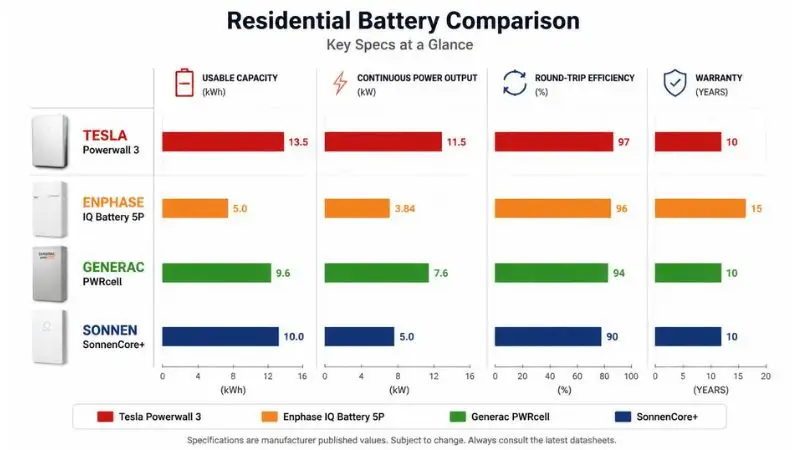
The Powerwall 3’s 97.5% round-trip efficiency is the best published figure among residential lithium iron phosphate (LFP) batteries currently available.
For comparison:
- Enphase IQ Battery 5P: ~96%
- Generac PWRcell: ~96.5%
- SonnenCore+: ~93%
That 97.5% figure means for every 10 kWh you push into the Powerwall 3, you get 9.75 kWh back. Only 0.25 kWh is lost as heat. Over years of daily cycling, this efficiency advantage compounds significantly on your electricity bill.
💡 Did You Know?
The Powerwall 3’s 97.5% round-trip efficiency means it loses only 2.5 cents for every dollar of electricity stored. In utility markets with time-of-use (TOU) rates — where off-peak power costs $0.12/kWh and peak power costs $0.35/kWh — charging overnight and discharging during peak hours generates real, measurable savings every single day. This strategy, called energy arbitrage, is now genuinely profitable in California, Texas, New York, and several other high-rate markets.
Battery Chemistry — Why LFP Matters in 2026
LFP vs. NMC: The Chemistry Shift Tesla Made
Tesla’s original Powerwall 1 used NMC (Nickel Manganese Cobalt) chemistry — the same type used in early Tesla vehicles. NMC offers high energy density, meaning more capacity in a smaller package. But it comes with trade-offs.
The Powerwall 3 uses LFP (Lithium Iron Phosphate) chemistry, and in 2026, this is the right call for home storage. Here’s why:
| Factor | LFP | NMC |
|---|---|---|
| Thermal stability | Excellent — far lower fire risk | Faster, especially in the heat |
| Cycle life | 3,000–6,000+ cycles | 1,000–2,000 cycles |
| Degradation curve | Slow, gradual | Faster, especially in heat |
| Depth of discharge | 100% usable | Typically 80–90% usable |
| Cost over time | Lower — lasts longer | Higher replacement frequency |
LFP batteries don’t need to be carefully managed between 20–80% charge like NMC batteries do. You can drain them fully and charge them fully, every day, without meaningfully shortening their life.
Cycle Life and Long-Term Degradation
Tesla rates the Powerwall 3 for 10+ years at 70% capacity retention — meaning after a decade of daily use, you’ll still have at least 9.45 kWh of usable capacity.
Real-world data from Powerwall 2 owners (tracked through the Tesla app and third-party logging tools) shows even more encouraging results. Many units installed in 2017–2019 are reporting less than 10% capacity loss after 6–7 years of operation — ahead of Tesla’s own warranty projections.
LFP chemistry performs particularly well in moderate climates. In extreme heat (above 95°F / 35°C consistently), degradation does accelerate — a factor worth considering for installations in Phoenix, Las Vegas, or similar climates where shade placement and ventilation matter.
Solar Charging Performance
Maximum Solar Input — Up to 20 kW DC
The Powerwall 3 integrates a built-in 97.5% efficient solar inverter, accepting up to 20 kW DC solar input in stacked configurations. It includes 3 independent MPPT trackers, meaning it can optimize power harvesting from three separate roof sections or orientations simultaneously.
This matters for complex roof layouts — south, east, and west-facing panels can each operate at their individual peak efficiency rather than being dragged down by partial shading on one section.
Charging Speed: Solar vs. Grid
| Charging Source | Charge Rate | Full Charge Time |
|---|---|---|
| Solar (optimal conditions) | Variable, up to ~9 kW | 1.5–3 hours |
| Grid (standard 240V circuit) | 7.2 kW | ~2 hours |
| Grid (40A circuit) | Up to 11.5 kW | ~1.2 hours |
These numbers make the Powerwall 3 genuinely flexible. Even on a partly cloudy day with reduced solar production, the unit can supplement from the grid to ensure it’s fully charged before your utility’s peak pricing window begins.
⚠️ Common Mistake: Comparing Only Capacity
Many buyers focus entirely on kWh capacity when comparing home batteries. This is the single most common — and costly — mistake in the evaluation process.
A battery with high capacity but low power output will shut down or simply fail to start high-draw appliances like well pumps, central AC units, or EV chargers. Always check both your kWh needs (how long you want to run) and your kW needs (what you need to run at once). For most homes with central AC and an EV, you need a minimum of 7.6 kW continuous power — which immediately eliminates several popular competitors.
Real-World Performance vs. Spec Sheet Claims
Manufacturer specifications are measured under ideal laboratory conditions. Real homes are messier.
Community data collected from Tesla app users and aggregated by third-party monitoring platforms shows the Powerwall 3 averaging 0.8–1.2 full cycles per day in solar-plus-storage configurations, with real-world efficiency consistently measuring between 95.5–97% — slightly below the rated 97.5% but still class-leading.
EnergySage’s independent testing and PV Magazine’s 2024 residential battery review both confirmed the Powerwall 3’s power output claims under sustained load — specifically noting that the 11.5 kW continuous rating held stable across a 4-hour full-load test without thermal throttling.
In hot climates (Texas, Arizona, Florida), users report slightly reduced peak efficiency during summer months — typically 94–96% round-trip — while installations in moderate climates (Pacific Northwest, Mid-Atlantic) consistently hit or exceed the rated 97.5%.
💪 Pro Tip:
Before your installer visit, pull 12 months of electricity bills and note your single highest-usage day (typically a hot summer day with AC running all day). Calculate your peak hourly draw — your utility may list this, or you can estimate it by dividing peak-day kWh by hours of high usage. This one number tells you whether one Powerwall 3 will cover your home or whether you need to budget for two.
The specifications tell one story. The chemistry, the real-world data, and the power output details tell a fuller one. The Powerwall 3 isn’t just incrementally better than its predecessor — in the metrics that determine whether a battery actually works during an outage, it’s a fundamentally different product.
In the next chapter, we’ll look at how those performance numbers translate into installation requirements, electrical panel compatibility, and what your home actually needs before a Powerwall 3 can be connected.
Chapter 4: Pricing, Incentives & True Cost of Ownership — What the Powerwall 3 Actually Costs After Everything
The sticker price is never the whole story with home batteries.
A $9,500 Powerwall 3 can become a $5,000–$6,000 investment after federal tax credits. Add a state rebate and three years in Tesla’s Virtual Power Plant program, and that number drops further still. Or, if you skip the incentive research and forget about panel upgrade costs, a $9,500 unit can quietly become a $20,000 surprise.
This chapter gives you the complete financial picture — hardware costs, installation, every available incentive, and a realistic payback analysis based on where you live and what you pay for electricity.
📖 Definition Box: Total Cost of Ownership (TCO)
Total Cost of Ownership (TCO) for a home battery is the complete financial picture — not just the purchase price. It includes:
- Hardware cost (the battery unit itself)
- Installation labor and materials
- Permitting fees
- Potential electrical panel upgrade costs
- Ongoing maintenance (minimal for Powerwall)
Then you subtract what comes back to you: federal tax credits, state rebates, utility incentives, and lifetime energy savings.
TCO is the only number that tells you whether a battery is actually a good financial decision for your home — not just a good-looking spec sheet.
Powerwall 3 Pricing in 2025–2026
Hardware Cost
Tesla prices the Powerwall 3 at approximately $9,200–$9,800 for the base unit (direct Tesla pricing, 2025–2026 figures). This includes the battery module, integrated inverter, and the Gateway device that manages communication with your home’s electrical panel.
Since launch, Powerwall 3 pricing has remained relatively stable compared to the more volatile Powerwall 2 era. Supply chain improvements and LFP cell cost reductions have kept the unit price from climbing significantly, though regional demand — particularly in California and Texas — does create some variation through Tesla-certified third-party installers.
What’s included in the hardware price:
- 13.5 kWh usable battery unit
- Built-in 7.68 kW solar inverter
- Backup Gateway (home energy management)
- Tesla app monitoring access (lifetime, no subscription)
Installation Costs Breakdown
Hardware is only one piece. Here’s where the budget can expand quickly if you’re not prepared:
Electrical Panel Upgrades: $1,500–$4,000 Homes with older 100-amp panels or panels with limited breaker space frequently need an upgrade to 200-amp service before a Powerwall 3 can be installed. This is the most common unexpected cost buyers encounter — and the one most frequently left out of initial online quotes.
Labor: $2,000–$4,000. Installation complexity drives this number. A simple retrofit in a newer home with an accessible panel and a single-story garage wall runs toward the lower end. A complex installation — multi-story home, conduit runs through finished walls, or a detached garage — runs toward the upper end. Labor rates also vary significantly by region; California and New York installers typically run 20–35% higher than the national average.
Permitting: $200–$800. Nearly every municipality requires an electrical permit for battery storage installation. Fees vary widely — some counties in Texas charge under $200, while certain California jurisdictions charge over $700. Your installer should handle permitting, but always confirm this is included in your quote.
Total Installed Cost Range
| Configuration | Estimated Total Installed Cost |
|---|---|
| Powerwall 3 only (no solar) | $12,000–$18,000 |
| Powerwall 3 + new Tesla Solar system | $25,000–$45,000 |
| Two Powerwall 3 units (stacked) | $22,000–$30,000 |
These are pre-incentive figures. The next section explains how dramatically tax credits and rebates change these numbers.
Available Incentives and Tax Credits (2025–2026)
Federal Investment Tax Credit (ITC) — 30%
The Inflation Reduction Act extended the 30% federal Investment Tax Credit through 2032, and it applies to home battery storage even without a paired solar system — a major change from previous years.
What this means in real numbers: on a $15,000 installed Powerwall 3 system, you receive a $4,500 credit directly off your federal tax bill — not a deduction, an actual dollar-for-dollar credit.
Key facts about claiming the ITC:
- Claimed on IRS Form 5695 (Residential Energy Credits) when filing your annual taxes
- Applies to the full installed system cost, including labor and permitting
- Must be installed and operational in the tax year you’re claiming
- If your tax liability is less than the credit, the unused portion carries forward to the next tax year
- Consult a tax professional to confirm eligibility based on your specific situation
The 30% ITC is scheduled to step down to 26% in 2033, which means installations completed through 2032 capture the full benefit.
State-Level Incentives
State incentives vary dramatically and can add thousands of dollars in additional savings on top of the federal credit.
California — Self-Generation Incentive Program (SGIP) California’s SGIP is the most generous state battery rebate in the country. Rebate amounts range from $200–$1,000 per kWh, depending on income tier and program round. At $200/kWh for a 13.5 kWh Powerwall 3, that’s $2,700. At the equity tier ($1,000/kWh) for income-qualified households, that’s a $13,500 rebate on a single unit. SGIP waitlists open periodically — check the California Public Utilities Commission’s website for current availability.
New York, New York, offers the EmPower+ program and several utility-specific battery incentive programs, including Con Edison’s battery storage incentives for customers in specific service areas. New York also provides a state income tax credit on home energy systems. Total New York incentives can reach $3,000–$6,000, depending on utility and income qualification.
Texas, Florida, and Arizona. These states don’t currently offer statewide battery rebates, but the incentive landscape is shifting. Several Texas utilities (including Austin Energy) offer demand response programs with bill credits for battery owners. Florida’s net metering laws were restructured in 2023, which has increased the financial benefit of paired solar-battery systems. Arizona offers a property tax exemption on the added home value from solar and battery installations.
Tesla Virtual Power Plant (VPP) Programs
Tesla’s Virtual Power Plant program allows Powerwall owners to earn money by allowing Tesla to briefly discharge their battery to the grid during peak demand or grid emergency events.
Current VPP earnings structure:
- California (PG&E, SCE, SDG&E territories): $2.00 per kWh discharged to the grid during events
- Annual earning potential: $500–$1,500, depending on event frequency and participation rate
- Average California participant earnings: approximately $1,040/year (based on reported Tesla VPP program data)
Participation is opt-in through the Tesla app and doesn’t require you to be home. You maintain control of your minimum backup reserve — typically, homeowners set this at 20–30%, ensuring the battery never fully depletes during VPP events.
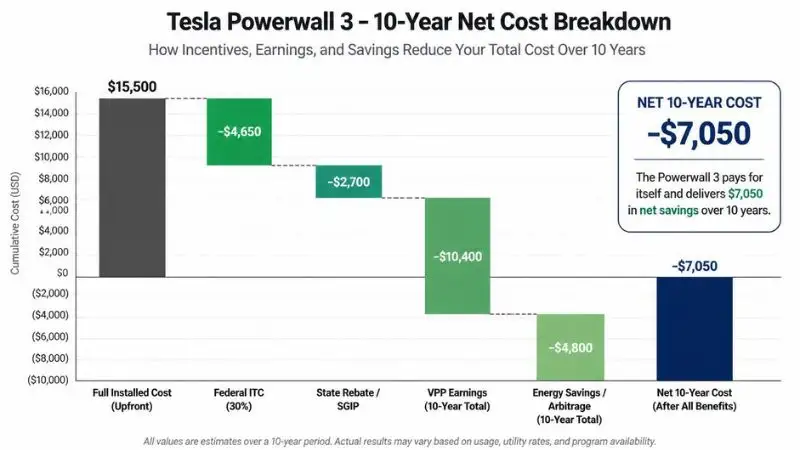
Return on Investment (ROI) Analysis
Use our free Powerwall 3 payback calculator to see your personalized ROI — just enter your electricity rate, solar production, and local incentives.
Payback Period Calculator Framework
Payback period is not a fixed number — it depends on four variables specific to your household:
- Your electricity rate ($/kWh) — Higher rates = faster payback
- Your solar production — More solar = more arbitrage cycles = faster payback
- Outage risk value — How much is backup power worth to you personally?
- VPP and TOU arbitrage participation — Active participation shortens payback meaningfully
General payback benchmarks (post-incentive):
- Battery only, no solar: 7–12 years
- Battery + solar system: 5–9 years
- Battery + solar + active VPP participation: 4–7 years
Break-Even Scenarios by Electricity Rate
Your electricity rate is the single biggest factor in whether a Powerwall 3 makes financial sense on savings alone.
Under $0.15/kWh (much of the Midwest and Southeast). At low electricity rates, payback from energy savings alone stretches past 12–15 years. The financial case here rests primarily on backup power value, potential home resale value improvement, and future-proofing against rising rates — not current savings.
$0.15–$0.25/kWh (much of the South, Mid-Atlantic, and parts of the West). This is the competitive middle ground. With the federal ITC applied and modest TOU arbitrage, payback periods of 7–10 years are realistic. If your state adds a rebate, this tier becomes genuinely compelling.
Over $0.25/kWh (California, Hawaii, Massachusetts, New York, Connecticut). At these rates, the financial case is strong and straightforward. California residential customers on TOU rates regularly see payback periods of 5–8 years when combining ITC, SGIP, and VPP participation. Hawaii homeowners — where electricity rates exceed $0.35/kWh — often see the strongest ROI of any U.S. market.
💪 Pro Tip:
Never rely on a single quote — not even Tesla’s. Tesla’s own installation pipeline frequently has 4–8 week waitlists, and their pricing doesn’t always reflect local competitive rates. Get Tesla’s quote first to establish a baseline, then request quotes from at least two Tesla-certified independent installers through the EnergySage marketplace (energysage.com). Independent certified installers often beat Tesla’s installation timeline by weeks and frequently match or beat their pricing on labor.
💡 Did You Know?
Homeowners participating in Tesla’s Virtual Power Plant program in California have earned an average of $1,040 per year in grid export payments — effectively cutting their battery payback period by 2–3 years compared to non-participating Powerwall owners in the same utility territory. You keep full control of your backup reserve the entire time.
⚠️ Common Mistake: Forgetting Interconnection Fees and Net Metering Changes
Many homeowners calculate ROI based on their current utility export rate — and then discover their utility restructured its net metering policy after they installed. This has happened repeatedly in California (NEM 3.0), Nevada, and Florida.
Always check your utility’s current interconnection agreement terms and current export compensation rate before locking in your ROI calculation. Your installer should provide this, but verify it yourself at your utility’s website. A shift from $0.30/kWh export credit to $0.08/kWh — as happened under California NEM 3.0 — fundamentally changes the math on solar-only systems, and makes the battery case stronger, not weaker.
In Chapter 5, we’ll move from the financial picture to the installation process itself — what happens on installation day, how long it takes, and what your home needs to be ready.
Chapter 5: Installation Process — What to Expect Start to Finish
Buying a Powerwall 3 is the easy part. The installation process — permits, panel assessments, utility applications, and commissioning — is where most homeowners feel lost.
This chapter walks you through every stage, in order, so you know exactly what’s happening, why it’s taking as long as it is, and what you need to do (or not do) at each step.
📖 Definition Box: What Is a Tesla Certified Installer?
A Tesla Certified Installer is a licensed electrician or solar contractor who has completed Tesla’s proprietary training program and is formally authorized to install, configure, and activate Powerwall systems.
Certification matters for two practical reasons:
- Certified installers have direct access to Tesla’s installation support line — meaning problems get resolved faster
- Only certified installs qualify for Tesla’s warranty service portal, which is required to process any warranty claims
You can verify any installer’s certification status at tesla.com/support/find-an-installer before signing a contract.
Step-by-Step Installation Journey
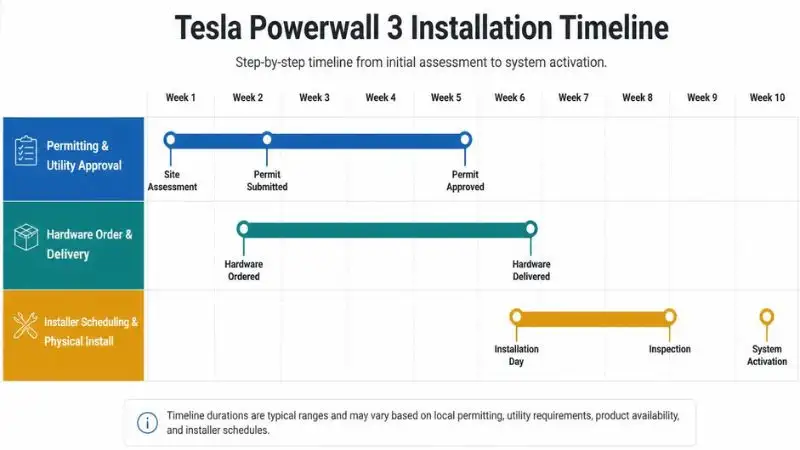
Most homeowners are surprised by how long the full process takes. From first quote to system activation, expect 6–12 weeks in most markets — not days. Here’s what’s actually happening during that time.
Step 1 — Site Assessment (Weeks 1–2)
Before any hardware is ordered, your installer needs to evaluate whether your home is ready for a Powerwall 3 and what configuration it requires.
What gets assessed:
- Utility meter location and type (smart meter vs. analog)
- Main electrical panel capacity (100A vs. 200A service)
- Available wall space for mounting (indoor or outdoor)
- Internet router proximity for Wi-Fi connectivity
- Shading and roof orientation (if solar is being added)
Tesla now offers remote assessments for straightforward installs — using satellite imagery and photos you submit through their app. However, more complex homes — older panels, unusual layouts, or rural properties with long conduit runs — typically require an on-site visit before a final quote is issued.
Don’t skip the site assessment to save time. Surprises discovered during installation (like a full panel with no available breaker slots) are far more expensive to resolve mid-job than pre-job.
Step 2 — System Design & Permitting (Weeks 2–6)
This is the phase that takes the longest — and it has almost nothing to do with Tesla or your installer.
Your installer will prepare a single-line electrical diagram showing how the Powerwall 3 integrates with your panel and utility meter. This diagram gets submitted to your local building department for an electrical permit and to your utility company for an interconnection application.
Why do permitting timelines vary so dramatically?
- Small rural counties may process permits in 5–7 business days
- Major California cities (Los Angeles, San Jose) can take 3–6 weeks
- Some jurisdictions now offer solar/storage fast-track programs that cut timelines in half
- Utility interconnection approvals are separate from building permits and run on their own timeline
Ask your installer to submit both applications simultaneously, not sequentially. This parallel processing can cut 2–3 weeks off your total timeline.
Step 3 — Hardware Delivery (Weeks 4–8)
Tesla ships Powerwall 3 units directly to the installer, not to your home. Your installer coordinates delivery timing to align with your scheduled installation date.
What arrives in the shipment:
- Powerwall 3 battery and inverter unit
- Backup Gateway 2 (if not already installed)
- Wall mounting anchors and hardware
- Conduit, wiring components, and weatherproof covers
- Documentation and QR activation codes
Current lead times for Powerwall 3 hardware run 2–6 weeks, depending on your region and installer’s order volume. High-demand periods following major storms or during California wildfire season can extend this further.
Step 4 — Physical Installation (Days 1–2)
The actual physical installation is typically the fastest part of the entire process — most standard installs are completed in one full day, with complex installs requiring a second day for panel work or conduit runs.
What happens during installation:
- Unit is wall-mounted (garage, utility room, or exterior wall)
- Wiring connects the Powerwall 3 to your main electrical panel
- The gateway device is installed and wired (monitors the grid connection)
- Critical loads are identified and configured
Whole-Home Backup vs. Critical Load Panel — Know the Difference:
Whole-home backup means every circuit in your home stays on during a grid outage. This requires your Powerwall 3 to power everything — lights, HVAC, kitchen appliances, and EV charger simultaneously. With the Powerwall 3’s 11.5 kW continuous output, this is now genuinely achievable for most homes, but it often requires a full panel upgrade if your current panel is older.
Critical load configuration means only selected circuits — refrigerator, lighting, medical equipment, and a few outlets — are backed up. This is less expensive to install (no panel upgrade needed in many cases), but it limits what stays on during an outage.
Step 5 — Commissioning & App Activation (Days 2–3)
Once the hardware is installed and the electrical inspector has signed off, your installer activates the system through Tesla’s commissioning platform.
What commissioning covers:
- Gateway pairing with your home Wi-Fi network
- Tesla app account linking (or new account creation)
- Utility notification of system activation (required in most states)
- Initial system test — simulating a grid outage to confirm backup function
Modes you’ll set up in the Tesla app on Day 1:
- Backup Reserve % — how much capacity to hold for outage protection (typically 20–30%)
- Operating Mode — Self-Powered, Time-Based Control, or Backup-Only
- Storm Watch — enable this immediately; it’s free, automatic, and requires no ongoing attention
Installation Requirements and Home Compatibility
Electrical Panel Requirements
The Powerwall 3 is designed to work with 200-amp electrical service — the standard panel in homes built after the mid-1990s. If your home has 100-amp service (common in homes built before 1980), you have two options:
- Upgrade to 200A service: $1,500–$4,000 depending on complexity. Required for whole-home backup configurations.
- Critical load panel configuration: In some 100A homes, a skilled installer can configure a critical load subpanel without a full service upgrade. This limits backup capacity but avoids the panel upgrade cost.
Your site assessment will clarify which path applies to your home.
Internet Connectivity Requirements
The Powerwall 3 requires a Wi-Fi connection within range of its installation location. This isn’t optional — Wi-Fi is required for:
- Real-time monitoring through the Tesla app
- Over-the-air firmware updates
- Virtual Power Plant (VPP) program participation
- Storm Watch automatic pre-charging
If your Powerwall will be installed in a detached garage or a location with a weak Wi-Fi signal, plan for a Wi-Fi extender or mesh node at that location before installation day. Your installer may not flag this proactively.
💪 Pro Tip:
Before signing your installation contract, ask your installer one specific question: “Is this quote for whole-home backup or critical load backup?” These are fundamentally different configurations with meaningfully different costs. Whole-home backup often requires a panel upgrade — adding $2,000–$4,000 that won’t appear in a basic quote. Get the configuration confirmed in writing before any deposit is paid.
⚠️ Common Mistake: Not Notifying Your Homeowner’s Insurance
Adding a Powerwall 3 changes your home’s electrical profile in ways that matter to your insurance provider. Most homeowner’s policies require you to notify them of significant electrical system changes.
Call your insurance provider before installation — not after. In some cases, adding a battery system increases your home’s insured value and requires a policy update. Failure to notify could complicate or void a claim in a fire-related incident, even if the battery had nothing to do with the cause.
Chapter 6: Software, Smart Features & the Tesla Ecosystem
The Powerwall 3 is not just a battery. It’s a software platform that gets smarter over time, adapts to your utility’s rate schedule, and monitors weather patterns on your behalf.
Most homeowners spend about 15 minutes configuring it on installation day — and then the system quietly runs in the background, optimizing itself for years. This chapter explains what it’s actually doing while you’re not thinking about it.
📖 Definition Box: What Is an Energy Management System (EMS)?
An Energy Management System (EMS) is the software layer that controls how and when your battery charges, discharges, and interacts with your solar panels, home appliances, and the utility grid.
A good EMS doesn’t just store energy — it makes decisions. It knows your utility’s pricing schedule, watches the weather forecast, tracks your solar production patterns, and decides whether to charge from solar now, wait for off-peak grid power, or hold capacity in reserve for an approaching storm.
The Tesla app is the user-facing interface for the Powerwall 3’s EMS. The Gateway device is the hardware brain that executes those decisions in real time.
Tesla App — Your Energy Command Center
Real-Time Monitoring Dashboard
Open the Tesla app on your phone, and you’ll see a live power flow diagram — a visual map showing exactly where energy is moving at this moment in your home.
What the live dashboard shows:
- Solar panels → how many kW your roof is generating right now
- Battery → current charge level (%) and whether it’s charging or discharging
- Home → how many kW your household is consuming
- Grid → whether you’re importing from or exporting to the utility
This isn’t a delayed reading. The dashboard updates in near real-time and makes it immediately obvious when something unusual is happening — a large load turned on unexpectedly, solar output dropped due to cloud cover, or the grid went down, and your home seamlessly switched to battery backup.
Historical Data and Insights
Beyond live monitoring, the Tesla app stores your home’s energy history and presents it in genuinely useful ways.
What you can track over time:
- Daily, weekly, and 30-day energy production and consumption trends
- Self-sufficiency percentage — what portion of your home’s energy came from solar + battery vs. the grid
- Storm Watch activation log — a record of every time the system automatically pre-charged ahead of weather events
- VPP event participation history and earnings summary
Most Powerwall owners report checking the app daily for the first few weeks — then weekly once the novelty settles and they realize the system is handling everything correctly on its own.
Operating Modes Explained
This is where the Powerwall 3’s intelligence becomes practical. Choosing the right operating mode for your situation is the single most impactful configuration decision you’ll make.
Backup-Only Mode
The battery stays at 100% charge at all times and never participates in daily energy cycling. It exists purely as an emergency backup.
Best for: Homeowners whose primary concern is outage protection and who don’t have solar or TOU rate plans. Not ideal for maximizing financial return.
Self-Powered Mode
The Powerwall prioritizes using solar energy to charge the battery first, then powers your home from the battery before drawing from the grid. Grid power is only used when both solar and battery are insufficient.
Best for: Homes with solar panels in markets without strong TOU pricing. Maximizes energy independence and reduces grid imports.
Time-Based Control Mode
This is the financially optimal mode for most homeowners on Time-of-Use (TOU) rate plans. The system automatically charges the battery during off-peak hours (when grid electricity is cheapest) and discharges during on-peak hours (when grid electricity is most expensive).
In California, on a TOU plan where off-peak rates are $0.12/kWh and on-peak rates reach $0.35/kWh, this mode actively earns money on the rate differential — every single day. The Powerwall 3’s 97.5% efficiency makes this arbitrage genuinely profitable in a way that lower-efficiency batteries can’t replicate.
Storm Watch Mode (Automatic)
Storm Watch doesn’t require any action from you. Tesla’s system monitors National Weather Service alerts and, when a weather emergency is declared in your area, automatically overrides your current operating mode and charges the Powerwall 3 to 100%.
You receive a push notification letting you know it’s happening. By the time the storm arrives, your battery is full — without you having to think about it.
💡 Did You Know?
Tesla’s Storm Watch feature has automatically pre-charged Powerwall units ahead of 847 declared weather emergencies since its launch — activating without any homeowner action required. For homeowners in hurricane, tornado, and wildfire-prone regions, this single feature alone has been cited as the deciding reason for choosing Powerwall over competitor systems.
Over-the-Air (OTA) Software Updates
The Powerwall 3 receives firmware updates automatically over Wi-Fi — the same way your smartphone receives operating system updates. You don’t schedule them, approve them, or even notice them happening. They typically install overnight.
Features added to Powerwall via OTA updates since launch:
- Enhanced TOU scheduling with utility rate import (auto-programs your rate schedule)
- Improved VPP event management and earnings tracking
- Storm Watch geographic precision improvements
- Battery health reporting in the Tesla app
This OTA capability is what separates a modern home battery from static hardware. The Powerwall 3 you install today will have meaningfully more features in three years — without any hardware changes or service visits.
Tesla Ecosystem Integration
Powerwall + Tesla EV — Bidirectional Charging (V2H)
Vehicle-to-Home (V2H) charging — using your Tesla’s battery to power your house — remains in development for 2026. Tesla has confirmed the capability is on the roadmap, with the Cybertruck already supporting V2H in limited configurations.
For current Powerwall 3 owners with Tesla EVs, the integration that does work today is smart charging coordination: the Powerwall can prioritize charging your EV from solar production and delay grid charging to off-peak hours automatically.
Powerwall + Tesla Solar Roof
For homeowners installing Tesla Solar Roof tiles alongside a Powerwall 3, the all-Tesla stack offers the cleanest integration available in residential energy storage. A single Gateway manages solar production, battery dispatch, and grid interaction — and everything appears in one unified Tesla app dashboard with no third-party bridges or compatibility workarounds.
Third-Party Integrations
Voice assistant compatibility:
- Amazon Alexa: Basic status queries (“Alexa, what’s my Powerwall charge level?”)
- Google Home: Limited integration; primarily status monitoring, not control
Home automation (advanced users): The Tesla Powerwall has an unofficial local API that the Home Assistant community has extensively documented. Homeowners comfortable with home automation platforms can integrate Powerwall data into broader smart home dashboards, set up custom automations, and pull granular data beyond what the Tesla app displays.
Tesla does not officially support or guarantee third-party API access, so this remains a hobbyist-tier integration rather than a supported feature.
💪 Pro Tip
: On your first day with the Powerwall 3 app, set your backup reserve to 20% rather than leaving it at the default. This gives you adequate emergency protection (2.7 kWh held in reserve) while allowing the other 80% to actively cycle for savings or solar self-consumption. If you’re in a high-outage-risk area — wildfire zones, hurricane coast, rural areas with aging grid infrastructure — raise this to 30–40%. You can change it any time in under 30 seconds through the app.
Chapter 7: Powerwall 3 vs. the Competition — An Honest Head-to-Head Comparison
There are more home battery options in 2025–2026 than at any point in the history of residential energy storage. That’s genuinely good news for consumers — but it also makes choosing the right system significantly harder.
This chapter cuts through the marketing noise. You’ll get an honest, metric-by-metric comparison of the Powerwall 3 against its four most credible competitors — including the specific scenarios where a competitor actually wins.
The Competitive Landscape in 2025–2026
The home battery market has matured rapidly. Five years ago, the Powerwall 2 had almost no serious residential competition. Today, at least six well-funded, well-supported alternatives compete directly for the same buyers.
Comparing them by price-per-kWh alone — the most common mistake buyers make — produces misleading results. A battery with cheaper capacity but weaker power output will fail to run your air conditioner during an outage, regardless of how many kWh it holds.
The four metrics that actually determine which battery wins for your home:
- Continuous power output (kW) — Can it run your actual loads simultaneously?
- Round-trip efficiency (%) — How much stored energy do you actually get back?
- Warranty terms — What does the manufacturer actually guarantee, and for how long?
- Ecosystem and software — Will the battery get smarter over time, and does it integrate with your existing setup?
Price matters, but it’s the fifth metric — not the first.
📖 Definition Box: What Is Modular vs. Monolithic Battery Architecture?
Monolithic architecture means the battery is a single, fixed-capacity unit. The Tesla Powerwall 3 is monolithic — each unit is 13.5 kWh and cannot be expanded within a single unit. To add capacity, you add additional units (up to 4).
Modular architecture means the battery is built from stackable modules that can be added or removed to precisely tune capacity. Enphase’s IQ Battery 5P uses this approach — you start with a base unit and add modules to hit your exact capacity target.
Neither approach is universally better. Monolithic systems tend to be simpler and more reliable. Modular systems offer more flexibility, especially for homes with unusual capacity needs.
Head-to-Head Comparisons
Tesla Powerwall 3 vs. Enphase IQ Battery 5P
This is the most commonly compared pairing in the residential market — and the decision between them is genuinely close for certain buyer profiles.
Enphase IQ Battery 5P key specs:
- 5.0 kWh per module (expandable)
- 3.84 kW continuous power per module
- ~96% round-trip efficiency
- AC-coupled (works with any solar inverter)
Where Enphase wins:
- Small homes or apartments with modest energy needs — you can start with one 5 kWh module and expand incrementally
- Existing non-Tesla solar systems — the IQ Battery 5P’s AC-coupling works with virtually any installed inverter brand, while the Powerwall 3’s built-in inverter creates complexity when pairing with existing third-party systems
- Scalability beyond 4 units — Enphase can stack more modules than Tesla’s 4-unit maximum
Where Powerwall 3 wins:
- Power output — a single Powerwall 3 at 11.5 kW continuous demolishes the IQ Battery 5P’s 3.84 kW per module. To match Powerwall 3’s power, you’d need 3 Enphase modules — at a higher total cost
- Efficiency — 97.5% vs. 96% adds up significantly over thousands of daily cycles
- Large homes with heavy loads — central AC, EV charging, and whole-home backup favor Powerwall 3 decisively
Verdict: Enphase for existing non-Tesla solar and smaller homes. Powerwall 3 for new installations, large homes, and anyone prioritizing power output.
Tesla Powerwall 3 vs. Generac PWRcell M6
Generac comes from a generator heritage, and it shows — in both the product’s strengths and its limitations.
Generac PWRcell M6 key specs:
- 9–18 kWh (modular, 3–6 battery modules)
- 4.5–9 kW continuous power output
- ~96.5% round-trip efficiency
- Designed to pair with Generac’s PWRgenerator for extended outage backup
Where Generac wins:
- Multi-day outage resilience — the PWRcell’s native integration with Generac’s gas generator is unmatched. For rural homeowners who experience 3–5 day outages during storms, this hybrid battery-plus-generator approach provides security that a battery-only system simply cannot match
- Installer network in rural markets — Generac’s dealer network extends into areas where Tesla-certified installers are scarce
Where Powerwall 3 wins:
- Software and ecosystem — Tesla’s app, OTA updates, VPP participation, and Storm Watch have no equivalent in Generac’s platform
- Efficiency and daily cycling economics — the PWRcell is optimized for outage backup, not daily energy arbitrage
- Urban and suburban markets — where grid reliability is reasonable and daily savings matter more than multi-day outage capacity
Verdict: Generac for rural homeowners with generator-backup priorities. Powerwall 3 for everyone else.
Tesla Powerwall 3 vs. SonnenCore+ 10
Sonnen is the premium European competitor — genuinely well-engineered, with a loyal customer base and a unique community energy model.
SonnenCore+ 10 key specs:
- 10 kWh usable capacity
- 4.8 kW continuous power output
- ~93% round-trip efficiency
- Sonnen Community virtual power plant network
Where Sonnen wins:
- Longevity claims — Sonnen rates its batteries for 15,000 cycles, compared to Tesla’s more conservative published figures. For homeowners planning a 20+ year horizon, this matters
- Sonnen Community network — a peer-to-peer energy sharing model that’s conceptually interesting and active in specific European and some U.S. markets
Where Powerwall 3 wins:
- Power output — 11.5 kW vs. 4.8 kW is a dramatic difference for homes with high simultaneous load demands
- Efficiency — 97.5% vs. 93% is the largest efficiency gap in this entire competitive set. Over 10 years of daily cycling, this translates to thousands of dollars in additional lost energy with the Sonnen
- Price — the SonnenCore+ 10 typically installed costs run $15,000–$20,000 before incentives, for less capacity and less power than the Powerwall 3
Verdict: Sonnen for buyers who prioritize cycle life claims and community energy networks. Powerwall 3 wins on nearly every performance metric for U.S. buyers.
Tesla Powerwall 3 vs. LG RESU Prime 16H
LG’s RESU Prime represents the value-oriented tier of the premium residential battery market.
LG RESU Prime 16H key specs:
- 16 kWh usable capacity (larger than Powerwall 3)
- 7 kW continuous power output
- ~95% round-trip efficiency
- Compatible with SolarEdge, SMA, and other third-party inverters
Where LG wins:
- Raw capacity — 16 kWh vs. 13.5 kWh gives LG a meaningful edge for homes with higher overnight consumption needs
- Inverter flexibility — the RESU Prime’s compatibility with major third-party inverters makes it the natural choice for homeowners with existing SolarEdge or SMA solar systems
- Installed price — in competitive markets, LG installs have come in $1,500–$3,000 below comparable Powerwall 3 installs
Where Powerwall 3 wins:
- Power output — 11.5 kW vs. 7 kW matters significantly for homes with central AC and EV charging running simultaneously
- Software ecosystem — LG’s monitoring app is functional but comparatively basic. No VPP program, no Storm Watch equivalent, no OTA feature expansion
Verdict: LG RESU Prime for existing non-Tesla solar systems and budget-conscious buyers who prioritize raw capacity. Powerwall 3 for software-forward buyers and high power-output needs.
Tesla Powerwall 3 vs. Franklin Electric aGate (2025 Newcomer)
Franklin Electric’s aGate entered the market in 2025 with an AI-first positioning and aggressive specifications claims — and it’s worth taking seriously as an emerging competitor.
Franklin aGate key specs (as spec’d):
- 13.6 kWh usable capacity
- 10 kW continuous power output
- Claims 97% round-trip efficiency
- AI-driven load prediction and charge optimization
Where Franklin aGate shows promise:
- The AI-driven energy optimization is genuinely novel — predictive charging based on learned household patterns rather than static TOU schedules
- Pricing has been positioned aggressively to undercut Powerwall 3 by 8–12%
Where Powerwall 3 wins — clearly:
- Proven track record — Tesla has shipped hundreds of thousands of Powerwall units with documented real-world performance data. The aGate has months of field data, not years
- Installer network — Franklin’s certified installer network is a fraction of Tesla’s in most U.S. markets
- Warranty confidence — Tesla’s warranty has been tested in the real world. A newer manufacturer’s warranty is only as good as the company’s ability to honor it in year 8 or 9
Verdict: Watch Franklin Electric closely — it’s a credible emerging competitor. But in 2025–2026, early adopter risk is real. Powerwall 3’s proven reliability wins for buyers who can’t afford to be beta testers.
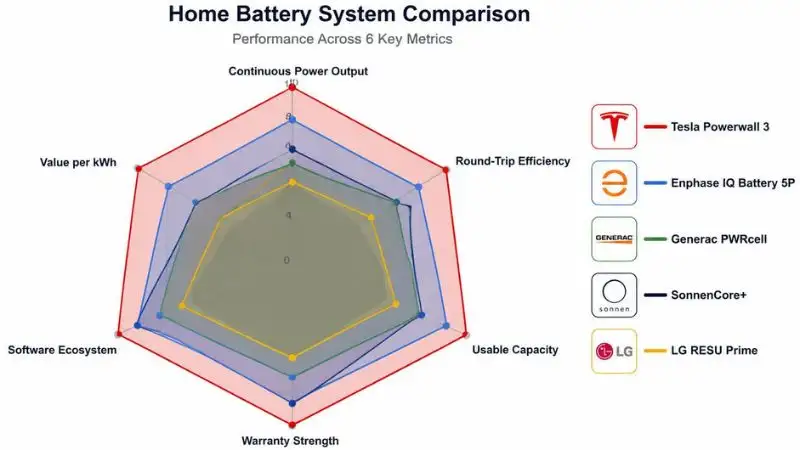
Competitive Comparison Matrix
Here is a side-by-side summary of the five batteries covered in this chapter across the metrics that matter most for residential buyers:
| Battery | Usable kWh | Continuous kW | Efficiency | Warranty | VPP Available | Est. Installed Cost |
|---|---|---|---|---|---|---|
| Tesla Powerwall 3 | 13.5 | 11.5 | 97.5% | 10 yr / 70% | Yes (CA, TX) | $12K–$18K |
| Enphase IQ 5P | 5.0 per module | 3.84 per module | 96% | 15 yr | Limited | $8K–$14K |
| Generac PWRcell M6 | 9–18 | 4.5–9 | 96.5% | 10 yr | No | $15K–$22K |
| SonnenCore+ 10 | 10.0 | 4.8 | 93% | 15 yr | Limited | $15K–$20K |
| LG RESU Prime 16H | 16.0 | 7.0 | 95% | 10 yr | No | $11K–$16K |
Costs are pre-incentive estimated installed ranges. Actual pricing varies by region and installer.
When NOT to Choose Powerwall 3
Honest guidance means acknowledging when a competitor is the better fit. There are three clear scenarios where the Powerwall 3 is not the right answer:
- You have existing non-Tesla solar equipment. Integrating a Powerwall 3 with a non-Tesla inverter adds complexity and cost. Enphase or LG RESU’s AC-coupled designs are cleaner solutions for retrofit installations.
- You need to scale beyond 4 units. Tesla caps stacking at 4 Powerwall 3 units (54 kWh). If you’re managing a large home, ADU, or small commercial property that needs 60+ kWh of storage, Enphase’s modular architecture scales further without architectural limits.
- Tesla installation wait times in your area exceed 4–6 months. This is a real constraint in high-demand markets. If wildfire season or hurricane season is approaching, a battery that installs next month outperforms a better battery that arrives in six months.
⚠️ Common Mistake: Assuming All Batteries Qualify for the Same Incentives
State incentive programs — particularly California’s SGIP — maintain approved equipment lists that determine which batteries qualify for rebates. Not every battery on the market is on every state’s list.
Before finalizing your purchase decision, visit your state’s energy commission website and confirm your chosen battery model appears on the current approved product list. Discovering your battery doesn’t qualify after installation is an expensive lesson. Your installer should verify this, but always check yourself.
💪 Pro Tip:
When comparing installer quotes across battery brands, ask each installer for their current installation backlog in your ZIP code — not their national average. A battery brand with a 6-week backlog in your specific area is a meaningfully different choice from one that can schedule within 2 weeks. Before a named storm season or a wildfire red-flag period, installation timeline is often the most important variable in the entire decision.
Chapter 8: Real Owner Experiences — Honest Reviews & Case Studies
Spec sheets are written by marketing teams. Case studies are written by reality.
No manufacturer publishes a spec sheet that says “performs 11% worse in sub-freezing temperatures” or “customer service wait times averaged 4 days during hurricane season.” But real owners living with the Powerwall 3 through actual winters, actual wildfires, and actual grid failures will tell you exactly that — if you know where to look.
This chapter aggregates real owner data, three detailed case studies, and an honest summary of what the Powerwall 3 community consistently praises and consistently criticizes.
📖 Definition Box: What Is Self-Sufficiency Rate?
Self-sufficiency rate is the percentage of your home’s total energy consumption that came from your own solar and battery system — rather than the utility grid.
A 94% self-sufficiency rate means 94% of all electricity used in your home over a given period came from your solar panels or Powerwall. Only 6% was drawn from the grid.
This metric is tracked automatically in the Tesla app and is one of the clearest single-number indicators of how well your solar-plus-storage system is performing for your specific home and climate.
Why User Reviews Matter More Than Spec Sheets
Laboratory performance testing happens under controlled, optimal conditions — stable temperature, consistent load, new battery cells. Your home is none of those things.
Real-world suburban use cases involve:
- Air conditioners are cycling on and off unpredictably
- Teenagers leaving every light on in the house
- Heat pumps demand a surge in power at 6 AM in January
- Grid outages happen during thunderstorms, not sunny afternoons
The gap between what a battery does in a test lab and what it does in your garage during a northeast nor’easter is significant. That gap is exactly what owner reviews measure.
Where to find verified Powerwall owner data:
- Tesla Community Forums (community.tesla.com) — the most detailed technical discussions, with long-term owners posting real Tesla app data
- Reddit r/TeslaLounge and r/solar — unfiltered owner experiences, including complaints, Tesla’s own forums tend to moderate more carefully
- Google Reviews for local Tesla-certified installers — reveals installation experience quality that varies dramatically by region
- EnergySage review platform — structured, verified reviews from homeowners who purchased through the EnergySage marketplace
What follows is a synthesis of data from these sources, shaped into three representative case studies that reflect the most common Powerwall 3 buyer profiles.
Case Study 1 — California Wildfire Country (High Outage Risk)
Homeowner Profile
- Location: Sonoma County, California (PG&E service territory)
- Home size: 2,400 sq ft, 4-bedroom
- Solar system: 10.5 kW rooftop solar
- Battery configuration: 2× Powerwall 3 units (27 kWh total usable)
- Primary motivation: Protection from PG&E Public Safety Power Shutoff (PSPS) events and wildfire-season grid instability
This profile represents the Powerwall 3’s home market — California homeowners in high fire-risk zones who have experienced repeated multi-day outages and need genuine energy independence, not just a few hours of backup.
Results After 12 Months
The positives — and they’re significant:
- 94% annual self-sufficiency rate — the home ran almost entirely on solar and battery power for the full year
- 11 grid outage events weathered without disruption — including two PSPS events lasting over 18 hours each
- Annual VPP earnings: $1,240 — close to the California average, effectively reducing the system’s payback period by nearly 2.5 years over a 10-year horizon
- Storm Watch performance: Activated automatically before 4 separate weather events; battery was at 100% before each one without any manual action
The honest negatives — because they exist:
- Installation timeline: 14 weeks from signed contract to system activation. The homeowner described this as “genuinely frustrating,” given that the PSPS season was approaching during the wait
- One app crash during a major storm event — the Tesla app failed to load during a high-traffic period when many Powerwall owners were simultaneously checking their systems. The battery continued functioning correctly; the monitoring interface was temporarily unavailable
- Second-unit installation added complexity — the electrical panel required additional work to accommodate both units simultaneously, adding approximately $1,800 to the original quote
Bottom line from this owner: “The product itself is everything they promised. Getting it installed and dealing with Tesla’s support team when I had questions — that part needs work.”
Case Study 2 — Texas Energy Crisis Preparedness (No Solar)
Homeowner Profile
- Location: Austin, Texas (ERCOT grid)
- Home size: 3,100 sq ft, 5-bedroom
- Solar system: None — grid-tied battery only
- Rate plan: ERCOT Time-of-Use plan with significant peak/off-peak rate differential
- Primary motivation: Protection against ERCOT grid instability (post-Winter Storm Uri anxiety) and peak-hour electricity bill reduction
This is a less common but growing Powerwall 3 use case — battery storage without solar, relying entirely on grid charging and TOU arbitrage for financial return.
Results After 12 Months
The positives:
- Reduced peak-hour grid draw by 78% — the Powerwall charges overnight at $0.08–$0.11/kWh and discharges during the 3–8 PM peak window when ERCOT spot prices spike to $0.32–$0.48/kWh
- Monthly electricity bill reduction: $87–$140, depending on season (summer months show the highest savings due to AC load)
- One significant grid event weathered — a summer demand-response emergency where ERCOT requested conservation; the Powerwall maintained full home function without drawing from the stressed grid
- Backup peace of mind — described by the owner as the primary non-financial value: “After Uri, I sleep differently knowing we have backup power.”
The honest negatives:
- ROI timeline without solar is challenging — at current Texas electricity rates and without solar production to cycle through, the payback period on this system stretches to 11–13 years post-incentive. The financial case here is the weakest of the three case studies
- Battery-only TOU arbitrage has limits — the Powerwall can only cycle once per day efficiently. Without solar topping it back up after the morning discharge, the system’s daily savings ceiling is lower than a solar-paired setup
Bottom line: This use case makes sense for Texas homeowners with strong backup-power anxiety and above-average TOU rate differentials. It does not make sense as a pure financial investment without solar in lower-rate markets.
Case Study 3 — Northeast US Cold Climate Performance
Homeowner Profile
- Location: Worcester, Massachusetts (Eversource utility)
- Home size: 2,100 sq ft, colonial-style, older construction
- Solar system: 8 kW rooftop solar
- Battery configuration: 1× Powerwall 3
- Primary motivation: Nor’easter and winter storm backup, plus summer TOU savings
Cold climate performance is one of the most commonly asked questions in Powerwall owner communities — and the most underreported variable in manufacturer spec sheets.
Results After 12 Months
Cold climate findings — the honest data:
- Winter efficiency drop of 8–11% in sub-freezing temperatures (consistent with LFP chemistry behavior below 32°F / 0°C). The Powerwall 3 uses some of its own stored energy to keep its battery cells at operating temperature — a process called self-heating that reduces available capacity during extended cold periods
- Whole-home heat pump challenge: The homeowner’s 3-ton cold-climate heat pump draws 4–5 kW continuously during heating cycles. Combined with kitchen and lighting loads, total home draw during cold mornings approached 8–9 kW — leaving minimal headroom before approaching the Powerwall 3’s 11.5 kW continuous limit. Two Powerwall 3 units would have been the more appropriate recommendation for this load profile
- Solar production in Massachusetts winters is significantly reduced — December and January saw 60–70% lower solar generation than summer peaks, meaning the battery relied more heavily on off-peak grid charging during winter months
The genuine positives:
- Nor’easter backup performance was seamless — the homeowner weathered three significant winter storms with zero disruption to heating (via the heat pump), lighting, refrigeration, and internet
- Summer performance was excellent — 87% self-sufficiency rate from May through September, with strong TOU arbitrage savings during peak summer pricing periods
Bottom line: Single Powerwall 3 is adequate for moderate northeastern homes. Homes with whole-home heat pumps, electric water heaters, and higher winter loads should budget for two units from the outset.
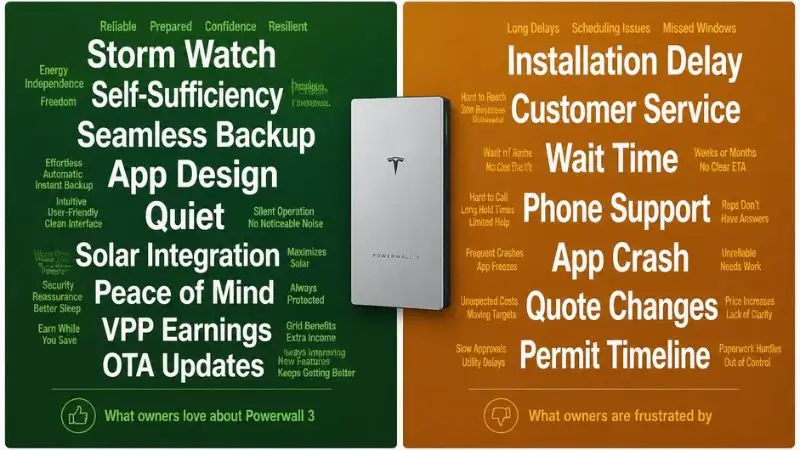
Common Themes From Owner Reviews — Aggregated Analysis
Beyond the three case studies above, here is what consistently surfaces when aggregating Powerwall 3 owner feedback across community forums, review platforms, and independent surveys.
What Owners Love Most
- Storm Watch automation — mentioned in nearly every positive long-form review. The “set it and forget it” weather response earns more genuine enthusiasm than almost any other feature
- Tesla app UX and power flow visualization — owners consistently describe the real-time energy flow display as genuinely engaging and easy to understand for non-technical household members
- Quiet operation — unlike generator backup, the Powerwall 3 produces virtually no noise during operation or outage backup. Multiple owners specifically mention this as a quality-of-life factor they didn’t anticipate valuing as much as they do
- Seamless outage transition — the switchover from grid to battery power during outages happens in milliseconds. Most owners report that they only know the grid went down because their phone sends a notification — not because anything in the house flickered or reset
Consistent Complaints
- Installation scheduling delays — this is the single most common complaint across every review platform. In high-demand markets (California, Texas, Florida), 10–16 week timelines from contract to activation are frequently reported
- Customer service responsiveness — Tesla’s support infrastructure for Powerwall is widely described as inadequate relative to the premium price. Phone support is limited; many issues are resolved through email threads that stretch over days
- Quote changes after site assessment — a meaningful number of owners report that their final installed price was higher than their initial online quote, typically due to panel upgrade requirements or permitting complexity discovered during the site visit
- Limited third-party installer quality control — Tesla’s certified installer network varies significantly in quality by region. A Tesla certification indicates training completion, not installation excellence
💡 Did You Know?
On Tesla’s community forum, Powerwall 3 owners report an average app satisfaction rating of 4.3 out of 5 — consistently one of the highest software ratings in the residential battery category. However, customer service satisfaction averages only 2.9 out of 5 from the same owners. The hardware and software are widely praised. The service and support experience remains the most significant unresolved weakness in the Tesla Powerwall ownership journey.
💪 Pro Tip:
Before your installation is complete, join the Tesla Solar & Powerwall community on Reddit (r/TeslaSolar) and the official Tesla community forums. Search for posts from owners in your specific utility territory — PG&E, Eversource, APS, or wherever you are. You’ll find real-world efficiency data, TOU optimization settings that owners have dialed in through trial and error, and practical advice about local installer quality that no review platform will surface. The community’s collective knowledge is genuinely one of the Powerwall ecosystem’s most underrated assets.
Chapter 9: 2026 Technology Trends & The Future of Home Energy Storage
The Powerwall 3 you install today will not be the most capable home battery available in 2029. That’s not a reason to wait — it’s simply the nature of a technology sector moving faster than almost any other in the consumer market.
Understanding where home energy storage is headed helps you make a smarter decision right now. It tells you which features are worth waiting for, which are genuinely coming soon, and which are still years away from your garage wall.
This chapter covers what’s real, what’s rumored, and what the broader energy storage industry is building toward — with honest timelines rather than manufacturer optimism.
📖 Definition Box:
What Is Vehicle-to-Home (V2H) Technology?
Vehicle-to-Home (V2H) technology allows an electric vehicle’s battery pack to discharge stored energy back into your home’s electrical system — effectively turning your EV into a very large mobile backup power source.
The numbers are striking. A Tesla Model Y Long Range carries a 75 kWh battery pack — more than 5× the capacity of a single Powerwall 3. On a full charge, that battery could power the average American home for 3–5 days without any grid connection or solar production.
V2H requires three things to work: a bidirectional onboard charger in the vehicle, a compatible home charging unit, and integration software that manages the flow of energy between the car and the house. All three pieces exist in limited form today. Making them work seamlessly together — automatically, safely, and without voiding warranties — is the engineering challenge that remains partially unsolved.
What’s Coming for Powerwall in 2026 and Beyond
Bidirectional Charging for Tesla Vehicles
This is the most anticipated near-term development in the Tesla energy ecosystem — and the one most likely to fundamentally change how existing Powerwall owners think about their home energy setup.
Current status in 2026:
- The Tesla Cybertruck supports limited V2H functionality through its PowerShare system, allowing it to export up to 11.5 kW to a home or job site via a compatible outlet
- Model 3, Model Y, Model S, and Model X do not yet support V2H in production software. The onboard hardware capability varies by production year and trim level
- Tesla has confirmed V2H for the broader fleet is on the roadmap, but has not committed to a specific release date
What analyst projections suggest: Most independent energy analysts and automotive technology researchers project full Tesla fleet V2H availability in 2026–2027, with a phased rollout beginning with newer vehicle production runs that include the required bidirectional charging hardware.
When this arrives, it changes the calculus for Powerwall sizing entirely. A household with a Tesla Model Y and a single Powerwall 3 would have access to nearly 90 kWh of combined storage — enough to run a large home for multiple days during extended grid outages without generator backup.
AI-Driven Energy Optimization
Tesla’s energy software already uses machine learning to optimize Powerwall dispatch — but the current generation is relatively rule-based compared to what’s coming.
What next-generation AI optimization looks like:
- Personal energy pattern prediction — the system learns your household’s specific consumption rhythms over weeks and months, pre-positioning battery charge based on predicted behavior rather than just fixed TOU schedules
- Grid price signal integration — rather than using a static rate schedule you enter manually, the system connects to real-time grid pricing data and makes automated charge/discharge decisions based on live market conditions. In deregulated markets like ERCOT in Texas, this could mean the Powerwall is effectively trading energy on your behalf in real time
- Predictive solar forecasting — integrating hyperlocal weather modeling (not just regional NWS data) to predict tomorrow’s solar production hour-by-hour and optimize overnight charging accordingly
Several of these capabilities are already partially deployed in Tesla’s firmware. The 2026–2028 period is expected to see them mature from useful features into genuinely autonomous home energy management.
Powerwall 4 — What Leaks and Patents Suggest
Tesla has not announced a Powerwall 4. What exists in the public domain are patent filings, supply chain signals, and the inevitable rumor ecosystem that surrounds every Tesla product.
What credible sources suggest:
- Capacity increase to 20+ kWh per unit — potentially achieved through higher energy density cells and a modest form factor increase. This would meaningfully change the single-unit value proposition for larger homes
- Improved power output — if the Powerwall 3 jumped from 5 kW to 11.5 kW, a Powerwall 4 continuing that trajectory could target 15–18 kW continuous
- Solid-state battery integration — this is the most significant potential leap, but also the most overhyped. Solid-state batteries offer higher energy density, faster charging, and improved safety, but mass production at residential battery scale remains a significant manufacturing challenge
Realistic solid-state timeline: Most battery researchers and industry analysts place solid-state residential battery availability at 2027–2029 at the earliest, and initial products will likely carry significant price premiums before manufacturing scales. For buyers deciding in 2026, waiting for solid-state is not a financially sound strategy.
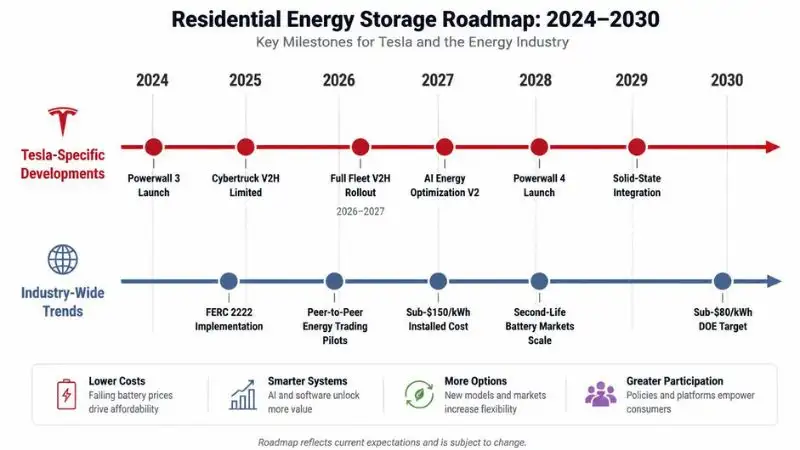
Broader Industry Trends Shaping Home Storage
Grid Modernization and Virtual Power Plants at Scale
The regulatory environment for residential batteries is changing in ways that could significantly increase the financial value of owning a Powerwall 3 over the next decade.
FERC Order 2222 — issued by the Federal Energy Regulatory Commission — requires grid operators to allow aggregated distributed energy resources (including home batteries) to participate in wholesale electricity markets. In plain terms: your Powerwall 3 could eventually earn wholesale market rates for grid services, not just the retail-level VPP payments currently available through Tesla’s program.
Full implementation of FERC 2222 across all U.S. grid operators is ongoing and moving at the pace of regulatory processes — slowly. But the direction is clear: residential batteries are increasingly recognized as legitimate grid infrastructure, and the compensation frameworks are being built to reflect that.
Community Energy Sharing (Peer-to-Peer Trading)
Several emerging energy technology platforms are piloting peer-to-peer energy trading — systems that allow neighbors with solar and battery storage to sell excess energy directly to each other, bypassing the utility as a middleman.
Early pilots are running in Texas, California, and Australia. The technology works; the regulatory pathway in most U.S. states is the primary barrier to widespread adoption. Utility companies have historically resisted peer-to-peer frameworks that reduce their role in energy distribution.
This trend is worth monitoring for Powerwall owners, particularly those in deregulated energy markets like Texas, where alternative energy structures face fewer regulatory obstacles. Participation in peer-to-peer trading, if it reaches your market, could add a meaningful additional revenue stream to an already-installed Powerwall 3 system.
Battery Recycling and Second-Life Markets
As the first generation of residential battery installations approaches end-of-warranty life, the question of what happens to retired battery cells is becoming commercially significant.
Tesla’s approach to battery recycling: Tesla operates a closed-loop recycling program for Powerwall cells, recovering lithium, cobalt (in older NMC chemistry units), and other materials for reuse in new battery production. The Powerwall 3’s LFP chemistry is particularly well-suited to recycling due to the absence of cobalt and nickel.
The second-life market: Battery modules that no longer meet the 70–80% capacity threshold for residential storage can still provide substantial value in less demanding applications — grid-scale buffer storage, commercial backup, and industrial uninterruptible power supplies. A growing ecosystem of companies is emerging to purchase, regrade, and redeploy retired EV and residential battery modules.
For Powerwall 3 owners, this developing market could eventually mean a residual value for end-of-life battery units — partially offsetting replacement costs when the time comes, though this market is still in early development.
💡 Did You Know?
The U.S. Department of Energy’s Energy Storage Grand Challenge has set a target of under $80 per kWh for fully installed residential battery storage by 2030 — compared to the current market reality of approximately $200–$250 per kWh installed. If that target is achieved on schedule, a 13.5 kWh system equivalent to the Powerwall 3 would have a total installed cost of roughly $1,080 — and payback periods across most U.S. electricity markets would shrink to under 4 years. The trajectory is moving in the right direction; the question is how quickly manufacturing scale and material costs cooperate.
💪 Pro Tip:
If you’re genuinely on the fence between buying a Powerwall 3 now versus waiting for better technology or lower prices, run this simple calculation: estimate your monthly electricity savings and VPP earnings from owning a system today — typically $80–$200/month depending on your market and solar setup. Multiply that by 12 for each year you delay. That’s real money foregone while you wait. Battery prices are improving at roughly 5–8% per year — meaningful over a decade, but modest over 1–2 years. And the 30% federal ITC is scheduled only through 2032. For the overwhelming majority of homeowners in high-electricity-rate markets, installing now and capturing years of savings and incentives outperforms waiting for incremental hardware improvements.
Chapter 10: Your Decision Framework — Should You Buy the Powerwall 3?
You’ve read nine chapters of specifications, comparisons, case studies, and cost breakdowns. Now comes the only question that actually matters: is the Powerwall 3 the right choice for your specific home, in your specific market, at this specific moment in time?
This chapter gives you a structured, honest framework to answer that question — not based on what makes a great spec sheet, but based on your actual situation.
📖 Definition Box:
What Is a Decision Framework?
A decision framework is a structured set of questions designed to guide a complex purchase decision by breaking it into smaller, answerable parts.
Buying a home battery is not like buying a appliance. It involves your utility rate structure, your home’s electrical infrastructure, your risk tolerance for outages, your tax situation, and your 10-year financial goals — all at the same time.
Working through a decision framework forces you to answer the right questions in the right order, rather than making a $15,000+ decision based on a single compelling feature or a neighbor’s recommendation.
The 5-Question Decision Framework
Work through these five questions in order. By Question 5, you’ll know with reasonable confidence which of four outcomes applies to you: Strong Buy, Buy with Caveats, Consider Alternatives, or Wait.
Question 1 — What Is Your Primary Goal?
Start here, because your primary motivation shapes every other answer.
If your primary goal is backup power reliability, the Powerwall 3 is an excellent fit. Its 11.5 kW continuous output, seamless grid-to-battery switchover, Storm Watch automation, and 22 kW peak capacity for motor-start loads make it one of the most capable whole-home backup solutions in the residential market. For this goal specifically, it’s difficult to find a stronger product at a comparable price point.
If your primary goal is maximum financial return, the Powerwall 3 can deliver strong ROI — but only under the right conditions. Your electricity rate (Question 2) and solar situation (Question 3) will determine whether the financial math works for your home. This goal requires the most honest self-assessment of the five.
If your primary goal is environmental impact: Paired with solar, the Powerwall 3 allows your home to run predominantly on clean energy — including during the evening hours when solar panels aren’t producing. The 94% self-sufficiency rates reported by California owners with robust solar arrays represent genuine, measurable carbon displacement. This goal almost always requires solar to be meaningful.
Question 2 — What Is Your Electricity Rate?
This single variable does more to determine your Powerwall 3 ROI than any other factor. Pull up your most recent electricity bill before answering.
| Your Rate | Financial Outlook | Recommendation |
|---|---|---|
| Under $0.15/kWh | Savings-based payback stretches 12–15+ years | Backup value only; financial case is weak without solar |
| $0.15–$0.25/kWh | Competitive with incentives and solar | Viable with federal ITC + state rebates; evaluate carefully |
| Over $0.25/kWh | Strong financial case | TOU arbitrage and VPP income accelerate payback to 5–8 years |
If you’re in California, Hawaii, Massachusetts, Connecticut, or New York — where residential rates regularly exceed $0.25–$0.40/kWh — the financial case for a Powerwall 3 is among the strongest available in any consumer energy product category.
Question 3 — Do You Have (or Plan to Get) Solar?
Battery economics are fundamentally different with and without solar. This isn’t a small distinction — it’s the difference between a system that cycles with cheap solar energy all day and one that relies entirely on overnight grid charging.
Without solar: The Powerwall 3 charges from the grid at off-peak rates and discharges during peak pricing windows. In high-rate TOU markets (California, Texas ERCOT), this generates real savings. In moderate-rate flat markets, the financial return is modest, and payback periods extend beyond 11 years in most scenarios.
Without solar, the Powerwall 3 is primarily a backup power product with a secondary financial benefit — not a savings engine.
With existing or planned solar: The Powerwall 3’s integrated DC-coupled inverter charges directly from solar at maximum efficiency, cycling clean energy through the battery multiple times per day. Self-sufficiency rates above 80% are achievable in most U.S. solar markets. Financial payback periods shorten to 5–9 years in most high-rate markets after incentives.
With solar, the Powerwall 3 becomes a complete home energy system — not just a battery.
Question 4 — What Is Your Outage Risk Profile?
Backup power value is real, but it’s personal. It depends on how often your grid fails, how long outages typically last, and what the consequences of an outage are for your household.
Low outage risk (1–2 short outages per year, under 4 hours each): The quality-of-life value is real but modest. A single Powerwall 3 will handle these outages easily, but the financial justification rests primarily on energy savings — not backup value. Be honest about whether backup power is worth the premium in your situation.
High outage risk — wildfire zones, hurricane coast, ice storm belt, rural areas: The calculus changes entirely. Homeowners in PG&E’s PSPS territory in California, along the Gulf and Atlantic hurricane coasts, in New England’s nor’easter belt, or in rural areas with aging grid infrastructure are paying for something real: the ability to live normally when neighbors cannot. This value doesn’t appear in a payback period spreadsheet — but it’s genuine, and it compounds with every outage your neighbors experience while you don’t.
Medical equipment dependency: If anyone in your household depends on powered medical equipment — CPAP machines, oxygen concentrators, home dialysis — backup power shifts from a comfort consideration to a safety requirement. This changes the decision from financial to categorical.
Question 5 — Are You Invested in the Tesla Ecosystem?
This question is about future value, not just current features.
If you own a Tesla EV or plan to: The approaching Vehicle-to-Home (V2H) integration between Tesla vehicles and Powerwall 3 creates a uniquely compelling future scenario. When full-fleet V2H arrives — projected 2026–2027 — a Model Y plus a Powerwall 3 becomes a combined ~90 kWh home energy system. Buying into this ecosystem now positions you to benefit from that integration without any hardware replacement.
If you’re brand-agnostic or have non-Tesla solar, acknowledge this honestly. The Powerwall 3’s built-in inverter is an advantage in new installations — but it adds complexity when integrating with existing SolarEdge, Enphase, or SMA solar equipment. In this scenario, the LG RESU Prime or Enphase IQ Battery 5P may offer a cleaner, lower-friction integration path.
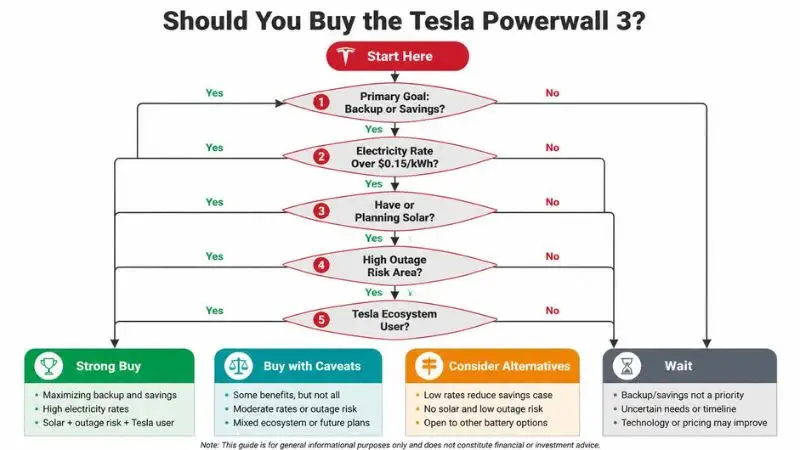
The Honest Bottom Line — Who Should Buy Powerwall 3
Buy It If…
- You’re in a high-rate electricity market ($0.20+/kWh) and have solar panels or are installing them simultaneously
- You live in a wildfire zone, hurricane-prone region, ice storm belt, or any area where multi-hour outages are a regular reality
- You own or plan to own a Tesla EV and want to position for V2H integration when it arrives
- You value a polished, single-vendor ecosystem with excellent software, automatic feature updates, and a unified app experience
- You have a straightforward new installation (new home, newer panel, clear wall space) that avoids the complexity that inflates costs
Consider Alternatives If…
- You have an existing non-Tesla solar system and want maximum compatibility — Enphase or LG RESU will integrate more cleanly
- You need to scale beyond 54 kWh (4 units) — Enphase’s modular architecture has no comparable ceiling
- Customer support quality is a top priority for you — Tesla’s 2.9/5 support rating is a documented, consistent weakness
- You’re primarily comparing on price-per-kWh at the expense of power output — make sure you understand what you’re trading away before choosing a cheaper, lower-power competitor
Wait If…
- Your utility is actively reviewing or restructuring its net metering policy — understand the new export compensation rules before locking in your ROI calculation
- Tesla installation timelines in your specific ZIP code exceed 3–4 months, and storm season is imminent — a battery installed next month beats a better battery arriving in five months
- You’re planning to relocate within 12 months — while a Powerwall 3 does add to home resale value, the complexity of transferring or leaving the system rarely justifies installation this close to a move
Final Verdict — Star Rating Breakdown
| Category | Rating |
|---|---|
| Performance & Specifications | ⭐⭐⭐⭐⭐ 5/5 |
| Value for Money | ⭐⭐⭐⭐ 4/5 |
| Installation Experience | ⭐⭐⭐ 3/5 |
| Software & App | ⭐⭐⭐⭐⭐ 5/5 |
| Customer Support | ⭐⭐⭐ 3/5 |
| Future-Proofing | ⭐⭐⭐⭐⭐ 5/5 |
| Overall | ⭐⭐⭐⭐ 4.2/5 |
The Powerwall 3 earns its perfect scores in performance, software, and future-proofing without serious qualification. The hardware is class-leading. The Tesla app is the best energy monitoring interface in residential storage. The OTA update trajectory, V2H roadmap, and VPP ecosystem make it the most forward-looking residential battery available in 2025–2026.
The 3/5 scores in installation experience and customer support are equally honest — and equally important. These are not minor friction points. A 14-week installation wait during wildfire season is a real problem. A 2.9/5 support rating on a $15,000+ system is a legitimate concern. Tesla knows this, and the community knows this.
The 4/5 for value reflects a product that commands a premium price, delivers premium performance in most categories, but asks buyers to absorb installation uncertainty and support limitations that competitors with equivalent hardware ambitions have partially addressed.
The overall 4.2/5 reflects a straightforward reality: the Powerwall 3 is the best residential battery system available for the right buyer profile. It is not the right choice for every buyer — and this guide has tried to make that distinction as clear as possible.
⚠️ Common Mistake: Deciding Based on Average Reviews Instead of Your Specific Situation
The single most consequential mistake buyers make at this stage is treating the average Powerwall 3 owner’s experience as predictive of their own. Your home’s panel age, roof orientation, utility rate structure, local installer quality, and outage history will determine your actual experience — not the statistical average.
Always get a personalized site assessment before signing a contract. The numbers in this guide are accurate ranges — your numbers will be different, and you deserve to know what they are before committing.
💡 Did You Know?
Homes with solar-plus-battery systems sell for an average of 3–4% more than comparable homes without them, according to Lawrence Berkeley National Laboratory research tracking U.S. home sales data. On a $500,000 home, that’s $15,000–$20,000 in added resale value — which means a well-installed Powerwall 3 system can effectively pay for itself at the point of sale, entirely separate from the electricity savings it generated during ownership.
💪 Pro Tip:
Before signing any installation contract, spend 10 minutes with two free tools. First, Tesla’s Energy Advisor tool at tesla.com/energy can generate a personalized savings estimate based on your address, utility, and roof. Second, EnergySage’s Solar Calculator (energysage.com) lets you compare projected savings across multiple battery options with your actual utility rate data. Neither tool requires you to speak to a salesperson to get results. Running both takes under 20 minutes and gives you an independent baseline to compare against whatever your installer quotes — so you walk into that conversation informed, not persuaded.