Your power station is not charging fully; it’s plugged in, the light shows activity, but it stops well short of 100%. Not at 0%. Not with an error. Just stuck at 82%, or 90%, or wherever it decided to stop.
The good news: in most cases, your battery isn’t damaged. Power stations are designed to stop charging early under several specific conditions, and once you know which one applies to you, the fix usually takes less than ten minutes.
Why Your Power Station Stops Charging Before 100%
1. The Battery Management System Is Protecting the Cells
Every lithium power station has a Battery Management System (BMS) constantly watching voltage, current, and temperature. When any of these drift outside a safe range, even briefly, the BMS slows or pauses charging rather than risk damaging the cells.
This isn’t a malfunction. It’s the same protection that keeps the battery safe for years instead of months.
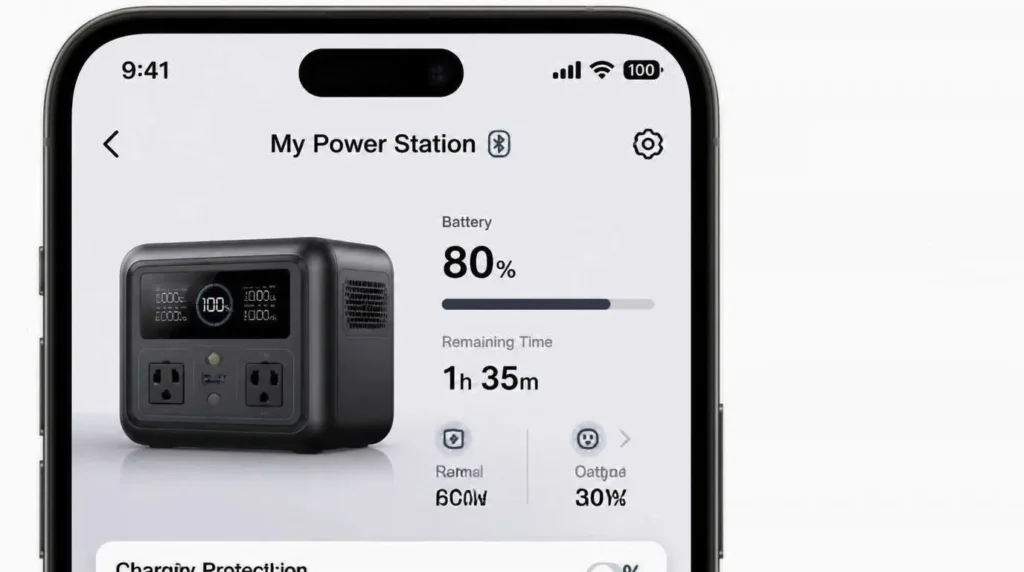
2. A Charge Limit Is Set in the App
This is the single most common cause, and the easiest to miss. Most major brands let you cap charging to extend battery lifespan:
- EcoFlow: “Charge Limit” under Charging Settings, often defaulted or manually set to 80%
- Anker SOLIX: “Charging Upper Limit” under Charging Management
- Bluetti: “UPS Mode” charge ceiling, sometimes set during a previous power-outage prep
If your station stops at the exact same percentage every single time, this is almost certainly the reason. It’s not a fault; it’s a setting someone (maybe you, months ago) turned on.
3. Cell Balancing Near Full Capacity
A power station doesn’t have one battery; it has dozens of individual cells wired together. As the pack approaches full, the BMS slows the charge rate so every cell finishes at roughly the same voltage. Skipping this step would shorten the battery’s overall lifespan.
This is why the last 10% almost always charges slower than the middle 80%, even when nothing is wrong.
4. Weak or Unstable Power Source
If the outlet, solar panel, or car socket can’t consistently deliver enough wattage, charging will crawl or stall well short of full. This is especially common with:
- Long, thin extension cords
- Solar panels under partial shade or at a poor angle
- Car charging on an old or marginal 12V battery
5. Cable, Adapter, or Port Issues
A worn cable or a port with dust and corrosion buildup can deliver just enough current to start charging, but not enough to sustain it to 100%. The station may show “charging” while actually receiving a fraction of its rated input.
6. Temperature Protection
Lithium batteries have a defined safe charging window, typically 32°F to 113°F (0°C to 45°C). A station left in a hot car, direct sun, or a cold garage will throttle or pause charging well before full, even though everything else is working correctly.
7. Firmware Bugs or an Inaccurate Display Reading
Occasionally, the battery is actually more charged than the screen shows. Outdated firmware or a display calibration drift can make the percentage appear “stuck” when the real state of charge is already higher than displayed.
📦 Definition Box
State of Charge Calibration: Lithium batteries estimate their charge level using voltage curves and coulomb counting rather than a direct, perfectly accurate measurement. Over months of partial charge cycles, this estimate can drift from the battery’s true charge level. A full charge-to-100%-then-discharge-to-near-empty cycle, when the manufacturer recommends it, resets this estimate to an accurate baseline.
How to Fix a Power Station That Won’t Charge Fully
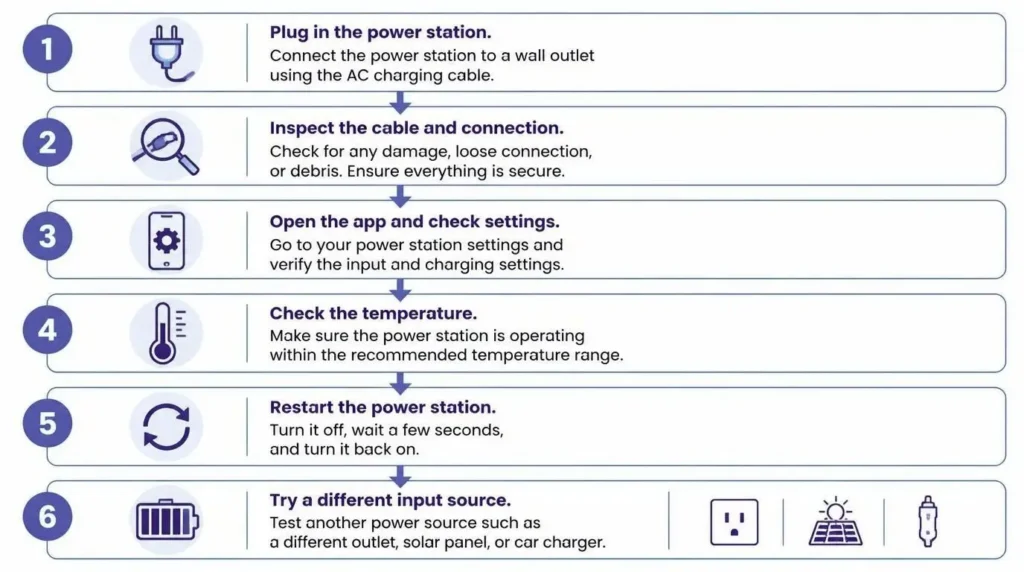
Work through these in order. Most people find their answer in the first three steps.
⚠️ Stop immediately if you notice swelling, a burning smell, smoke, leaking, or a visibly melted port. Disconnect and contact the manufacturer; don’t continue troubleshooting.
Step 1: Test a known-good outlet. Plug directly into the wall, skip any extension cord or power strip, and confirm the display shows active input wattage.
Step 2: Inspect the cable and port. Look for fraying, bent pins, or debris with a flashlight. Try the original OEM cable if you’ve been using a replacement.
Step 3: Check the app for a charge limit. Open the companion app, go to charging settings, and confirm there’s no active cap below 100%. This alone resolves the majority of cases.
Step 4: Let it reach a safe temperature. If the unit feels hot or has been in the cold, move it to a dry, ventilated room-temperature space and wait 30–45 minutes before trying again.
Step 5: Restart and check for firmware updates. A simple restart clears most temporary glitches. Install any pending firmware update while the unit is plugged in with at least 20% charge.
Step 6: Try a different charging method. If AC charging stalls, test solar or car input (within the station’s rated limits). This helps confirm whether the issue is the battery or the specific power source.
AC vs. Solar vs. Car Charging: What Changes
| Method | Typical Behavior | Most Common Stall Cause |
|---|---|---|
| AC Wall | Should be the most stable and fastest | Loose outlet, extension cord, or weak circuit |
| Solar | Varies with sunlight, cloud cover, and angle | Shading, poor panel angle, or voltage below the MPPT threshold |
| 12V Car | Slowest method, especially on large-capacity units | Loose socket connection, weak car battery, or long charge time mistaken for a stall |
If a station charges normally on AC but stalls on solar or car power, the fault is almost always in that specific source, not the battery itself.
When Stopping Below 100% Is Actually Normal
Not every early stop is a problem. Two situations are completely expected:
The last stretch is naturally slower. Charging from 90% to 100% can take as long as the first 50% did, because the BMS deliberately throttles current to protect the cells. If the percentage is still climbing, even slowly, with no error shown, this is the battery finishing its normal final stage.
A repeatable stopping point points to a setting, not a fault. If your station stops at exactly 80% or exactly 90% every time, check the app before assuming anything is broken. A consistent number is the signature of a configured limit, not random failure.
When to Contact Customer Support
Reach out to the manufacturer if the station still stops well short of full after testing different cables, outlets, and charging methods, or if you see repeated error codes, sudden capacity loss, or failure across multiple reliable power sources.
Stop using the unit immediately and contact support if you notice swelling, leaking, smoke, a burning smell, severe overheating, or melted charging ports. Never open the battery enclosure yourself.
When contacting support, have ready: the model name, serial number, firmware version, any error codes shown, and a short description of exactly what happens during charging.
Still Having Trouble? Check Your System First
Before assuming the worst, it’s worth running the numbers on your actual setup. Our free [Solar Load & Power Station Calculator] shows you exactly how much input wattage your devices and charging source can realistically support, which catches a lot of “not charging fully” cases that turn out to be a mismatch between the source and the station rather than a fault in either one.
Conclusion
Most “not charging fully” cases trace back to one of three things: a charge limit you forgot was set, a weak or unstable power source, or the battery simply finishing its slower final stage near 100%. Work through the basics first — cables, outlets, and app settings, before assuming the battery itself has a problem. If the issue persists across multiple reliable sources, or you notice any physical warning signs, stop using the unit and reach out to the manufacturer.
FAQ
Q1: Why does my power station stop charging at exactly 80% or 90%?
This almost always points to a charge limit set in the companion app, a feature designed to extend long-term battery life. Open your app’s charging settings first. If no limit is active, temperature protection or a display calibration issue could also cause it; restart the unit and retest on a reliable AC outlet.
Q2: Why does charging slow down so much near 100%?
This is normal lithium battery behavior. As cells approach full charge, the BMS reduces current to balance individual cells and manage heat and voltage precisely. If the percentage is still rising and no warning appears, the unit is simply completing its final charging stage.
Q3: How do I recalibrate a power station that won’t show an accurate charge level?
Follow your specific model’s recommended procedure; some only need a restart, others require a full charge-to-100%-then-near-empty cycle. Don’t repeatedly drain the battery to 0% unless the manufacturer specifically recommends it, since this stresses the cells unnecessarily.
Q4: Is it normal for solar charging to stop before reaching full?
Yes, this is common. Solar input naturally drops with cloud cover, shade, or a poor panel angle, and any devices drawing power from the station at the same time reduce how much reaches the battery. If AC charging reaches 100% normally but solar consistently stalls, the issue is with the solar setup, not the battery.
Q5: Should I worry if my power station has never reached 100%?
Not necessarily; check the app for an active charge limit first. If no limit is set and the unit genuinely can’t pass a certain point even on a known-good outlet after trying the troubleshooting steps above, that’s worth contacting support about, since it may indicate degraded cell capacity rather than a setting.